
Yes, you can fit a 65 inch TV in many SUVs—but it depends on the model, seating configuration, and how you pack it. With proper planning, protective materials, and smart loading techniques, transporting your new big-screen TV is totally doable without damage.
So, you just scored a shiny new 65 inch TV—congrats! It’s sleek, modern, and promises movie-night perfection. But now comes the real challenge: getting it home. You’re driving an SUV, which feels roomy enough, but will it actually fit? The short answer? Yes, in most cases, you can fit a 65 inch TV in an SUV—but it’s not as simple as tossing it in the back and hitting the gas.
SUVs come in all shapes and sizes, from compact crossovers like the Toyota RAV4 to full-size beasts like the Chevrolet Suburban. And while they’re generally more spacious than sedans or hatchbacks, not every SUV is created equal when it comes to cargo capacity. A 65 inch TV isn’t just big—it’s also heavy (often 50–70 pounds), fragile, and awkwardly shaped. So before you load up, you’ll need to do some planning. Think of it like packing for a trip: you wouldn’t shove your suitcase into the trunk without checking if it fits, right? Same goes for your TV.
The good news is that with a little prep, the right vehicle, and some smart packing, transporting a 65 inch TV in an SUV is totally manageable. Whether you’re picking it up from the store, moving it from a friend’s house, or upgrading your home theater, this guide will walk you through everything you need to know—from measuring your space to securing your TV for the ride.
Key Takeaways
- Most midsize to large SUVs can accommodate a 65 inch TV when rear seats are folded down or removed, especially models like the Honda Pilot or Ford Explorer.
- Measure both your TV and cargo space before buying or moving—TVs are measured diagonally, but cargo space is measured in length, width, and height.
- Always transport the TV upright or flat on its side (never on the screen) using foam padding, blankets, and secure straps to prevent shifting.
- Remove removable parts like stands or wall mounts to reduce size and protect delicate components during transit.
- Use the original packaging if available, as it’s designed specifically for safe transport and includes custom foam inserts.
- Consider professional delivery services for high-end TVs—many retailers offer white-glove setup and haul-away options.
- Drive carefully and avoid sudden stops—even with padding, a 65 inch TV is heavy and fragile, so smooth driving is essential.
📑 Table of Contents
Understanding TV and SUV Dimensions
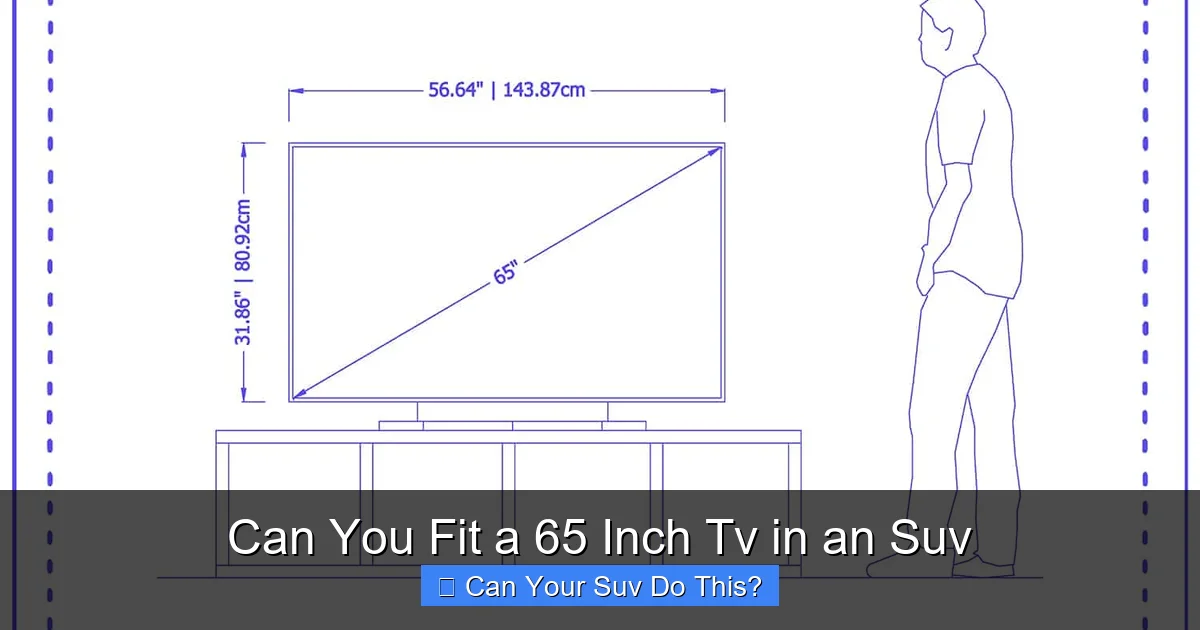
Before you even think about loading your TV into your SUV, you need to understand the actual size of what you’re dealing with. A 65 inch TV is measured diagonally from corner to corner of the screen. But that doesn’t tell the whole story. The actual dimensions—length, width, and depth—are what matter when it comes to fitting it into your vehicle.
Most 65 inch TVs are around 57 inches wide, 33 inches tall, and 2–3 inches deep, depending on the model and whether it has a curved screen or slim bezel design. That’s a substantial piece of equipment. For example, a Samsung QN90B 65” Neo QLED TV measures approximately 57.1” x 32.9” x 1.6” without the stand. Add the stand, and the depth increases to about 10–12 inches. So if you’re planning to transport it with the stand attached, you’ll need even more room.
Now, let’s talk SUVs. Cargo space varies widely. A compact SUV like the Honda CR-V offers about 39 cubic feet behind the second row, while a full-size SUV like the Ford Expedition boasts over 100 cubic feet with all seats folded. But cubic feet don’t always translate directly to usable space—especially when you’re dealing with a long, flat object like a TV.
To get a real sense of fit, measure the cargo area of your SUV. Open the rear hatch, fold down the rear seats (if possible), and use a tape measure to check the length from the back of the front seats to the tailgate, the width between the wheel wells, and the height from the floor to the ceiling. Most SUVs have a cargo length of 40–60 inches with seats up, and 60–80+ inches with seats folded. A 65 inch TV is about 57 inches wide, so it will likely need to lie flat or at an angle to fit.
Why Diagonal Measurement Misleads
One common mistake people make is assuming that because a TV is “65 inches,” it will fit in a space that’s 65 inches long. But that’s not how it works. The 65-inch measurement is diagonal—like the hypotenuse of a right triangle. So while the screen spans 65 inches corner to corner, the actual width is much less, and the height is even smaller. However, when transporting, you’re not placing the TV diagonally in the car (unless you’re doing some advanced Tetris-style packing). You’re laying it flat or standing it upright, which means you need to account for its full width and height.
For example, if your SUV’s cargo area is only 50 inches wide between the wheel wells, a 57-inch-wide TV won’t fit lying flat unless you angle it or remove the seats. That’s why it’s crucial to measure both the TV and your vehicle’s interior dimensions.
SUV Size Categories and Their Capabilities
Not all SUVs are built the same. Here’s a quick breakdown of how different SUV categories stack up when it comes to fitting a 65 inch TV:
– Compact SUVs (e.g., Toyota RAV4, Honda CR-V): These are great for city driving but have limited cargo space. With rear seats folded, you might get 60–70 inches of length, but width between wheel wells is often under 45 inches. A 65 inch TV may fit diagonally or with the front seats pushed forward, but it’s tight.
– Midsize SUVs (e.g., Ford Explorer, Hyundai Palisade): These are your best bet. With three rows of seating, they often have flat-folding second and third rows, creating a long, open cargo area. Length can exceed 80 inches, and width is usually 48–52 inches—plenty of room for a 65 inch TV lying flat.
– Full-Size SUVs (e.g., Chevrolet Tahoe, Ford Expedition): These are the champions of cargo space. With all seats folded, you can easily fit a 65 inch TV—and still have room for groceries, luggage, or even a small couch. Some models even have power-folding seats for easy access.
So if you drive a midsize or full-size SUV, you’re in good shape. Compact SUVs can work, but you’ll need to get creative.
Preparing Your SUV for TV Transport
Visual guide about Can You Fit a 65 Inch Tv in an Suv
Image source: bmwinsights.com
Once you’ve confirmed your SUV can handle the size, it’s time to prep the vehicle. This isn’t just about clearing out space—it’s about creating a safe, secure environment for your TV.
Clear and Clean the Cargo Area
Start by removing any clutter from the back of your SUV. Take out bags, tools, sports equipment, or anything else that’s taking up space. You want a clean, open area to work with. If you have a third row, fold it down completely. In many SUVs, the second row also folds flat—check your owner’s manual if you’re unsure how to do this.
Next, clean the floor. Dirt, gravel, or sharp objects can scratch the TV’s packaging or, worse, damage the screen if the box shifts. A quick vacuum or wipe-down ensures a smooth surface.
Protect the Interior
Even with the original box, your SUV’s interior is at risk. The corners of the TV box can scratch leather or scuff carpet. To prevent this, lay down a moving blanket, old comforter, or thick towels on the cargo floor. You can also use cardboard sheets or foam padding for extra protection.
If you’re transporting the TV upright (more on that later), consider placing a soft barrier between the TV and the side panels of the SUV. This prevents rubbing and potential damage during turns or bumps.
Secure Loose Items
Before loading the TV, make sure nothing else in the SUV can move around. Loose items can shift during driving and collide with the TV, causing damage. Stow smaller items in the glove box, center console, or under seats. If you’re carrying passengers, ask them to hold onto bags or backpacks instead of placing them in the cargo area.
How to Safely Load a 65 Inch TV
Now for the main event: loading the TV. There are two primary methods—lying flat or standing upright—and each has its pros and cons.
Option 1: Lying Flat (Recommended)
This is the safest and most common method. Place the TV box flat on the cargo floor, screen-side down (if the box allows) or on its side. Never place the TV screen-down directly on a hard surface—always use padding.
Here’s how to do it step by step:
1. Open the box carefully. Use scissors or a box cutter to cut along the tape, but avoid slicing into the foam or TV inside.
2. Remove the TV and accessories. Take out the stand, remote, cables, and any manuals. Store these in a separate bag or box so they don’t get lost.
3. Keep the original foam inserts. These are custom-molded to protect the TV and should be reused during transport.
4. Place the TV in the box. Lay it flat with the screen facing up or down, depending on the box design. Most boxes are labeled “This Side Up”—follow that instruction.
5. Pad the sides. Use moving blankets, foam, or towels to fill any gaps between the box and the SUV walls. This prevents shifting.
6. Secure the box. Use ratchet straps or bungee cords to tie the box down. Anchor points vary by SUV model—look for hooks in the cargo floor or seat brackets.
Option 2: Standing Upright
Some people prefer to stand the TV upright, especially if space is tight. This can work, but it’s riskier. The TV is top-heavy and could tip over during sudden stops or sharp turns.
If you choose this method:
– Use the original box. The box is designed to support the TV vertically.
– Brace the sides. Place foam blocks or pillows on both sides to prevent rocking.
– Secure the top. Use straps to anchor the top of the box to the headrests or seat frames.
– Never leave it unattended. If you stop for gas or a bathroom break, make sure the TV is stable and won’t fall.
What Not to Do
Avoid these common mistakes:
– Don’t place the TV screen-down on a hard surface. Even with padding, pressure can damage the display.
– Don’t stack heavy items on top. Books, coolers, or luggage can crush the box.
– Don’t transport it in the passenger seat. Airbags can deploy with deadly force in a crash, and the TV could become a projectile.
– Don’t drive with the tailgate open. It’s unsafe and illegal in many areas.
Alternative Solutions If Your SUV Isn’t Big Enough
What if your SUV just isn’t cutting it? Maybe you drive a compact model, or you’ve got a full car with kids and gear. Don’t worry—there are still options.
Rent a Larger Vehicle
Many car rental companies offer SUVs, minivans, or even pickup trucks for daily rental. A minivan like the Honda Odyssey or Chrysler Pacifica has sliding doors and a low floor, making it easy to load large items. A pickup truck with a covered bed (like a Ford F-150 with a tonneau cover) can also work, though you’ll need to secure the TV carefully to prevent weather damage.
Rental costs vary, but you can often get a vehicle for $50–$100 per day. It’s a small price to pay for peace of mind.
Use a Trailer or Roof Rack
If you have a trailer hitch, consider renting a small utility trailer. These are inexpensive and can carry large, flat items like TVs, furniture, or appliances. Just make sure the trailer is covered or use a tarp to protect the TV from rain and road debris.
Roof racks are less ideal for TVs due to wind resistance and exposure, but some heavy-duty cargo boxes can accommodate flat items. However, this method is risky and not recommended unless you have experience.
Hire Professional Movers or Delivery
Many electronics retailers offer delivery and setup services. Best Buy, for example, provides white-glove delivery for large TVs, including unboxing, placement, and even hauling away the old TV. Prices start around $100–$200, but it’s worth it for high-end models.
You can also hire local movers through apps like Dolly or TaskRabbit. These services are affordable and often include insurance coverage.
Tips for a Smooth Ride
Once your TV is loaded, the journey isn’t over. How you drive matters just as much as how you pack.
Drive Smoothly
Avoid sudden acceleration, hard braking, and sharp turns. These movements can cause the TV to shift, even with straps. Drive at moderate speeds and leave extra space between you and the car ahead.
Check the Load Regularly
If you’re driving a long distance, stop every hour or so to check that the TV is still secure. Vibrations and bumps can loosen straps over time.
Park Smart
When you arrive, park on level ground and avoid steep driveways or uneven surfaces. Unload the TV carefully, preferably with a helper. Lift with your legs, not your back, and keep the box balanced.
Real-World Examples and Success Stories
Still not convinced? Here are a few real-life examples of people who successfully transported 65 inch TVs in their SUVs:
– Sarah, Honda Pilot owner: “I bought a 65 inch LG OLED during a Black Friday sale. My Pilot has flat-folding seats, so I laid the TV flat in the back with blankets on the sides. It fit perfectly, and I used straps to keep it from sliding. No scratches, no issues.”
– Mike, Toyota RAV4 driver: “My RAV4 is compact, but I managed to fit the TV by removing the rear seats entirely. It was a tight squeeze, but with the front seats pushed forward, it worked. I drove slowly and took back roads to avoid potholes.”
– Lisa, Ford Expedition owner: “I didn’t even fold the seats down. The TV lay flat in the third row with room to spare. I brought my kids along, and they sat in the second row. It was like a mobile movie theater!”
These stories show that with the right approach, almost any SUV can handle a 65 inch TV.
Conclusion
So, can you fit a 65 inch TV in an SUV? Absolutely—especially if you drive a midsize or full-size model. With proper measurements, protective padding, and smart loading techniques, transporting your new TV is not only possible but safe.
Start by checking your SUV’s cargo dimensions and comparing them to your TV’s actual size. Clear out the back, protect the interior, and choose the best loading method for your setup. Whether you lay it flat or stand it upright, always secure the TV and drive carefully.
And if your SUV just isn’t up to the task, don’t stress. Rent a larger vehicle, use a trailer, or opt for professional delivery. Your TV is an investment—treat it with care, and it’ll reward you with years of entertainment.
Remember, it’s not just about fitting the TV in the car. It’s about getting it home in one piece. With a little planning, you’ll be kicking back with your new 65 inch screen in no time.
Frequently Asked Questions
Can I fit a 65 inch TV in a compact SUV like a Honda CR-V?
It’s possible, but challenging. You may need to fold down the rear seats, remove them, or angle the TV diagonally. Measure your cargo space first and use plenty of padding to protect the TV.
Should I transport the TV in its original box?
Yes, always use the original packaging if available. It includes custom foam inserts and is designed to protect the TV during transport. If you no longer have the box, use a sturdy cardboard box with ample padding.
Can I lay the TV flat on its screen?
No, never place the TV screen-down on a hard surface. Even with padding, pressure can damage the display. Always transport it in the box or on its side with the screen protected.
Do I need help loading a 65 inch TV?
Yes, it’s highly recommended. A 65 inch TV can weigh 50–70 pounds and is awkward to maneuver. Having a second person helps prevent drops, scratches, or injury.
What if my SUV has a sunroof or low ceiling?
A low ceiling may prevent upright transport. In that case, lay the TV flat. If the sunroof opens into the cargo area, make sure it’s closed and won’t interfere with the TV’s height.
Is it safe to drive with a TV in the back of my SUV?
Yes, as long as the TV is properly secured and doesn’t block your view. Use straps to anchor it, avoid sudden moves, and never place it where it could become a projectile in a crash.