

Changing the battery in your Toyota RAV4 key fob is a simple DIY task that takes just minutes and requires no special tools. With the right battery and a few careful steps, you can restore full functionality to your key fob and avoid costly dealership visits.
Key Takeaways
- Use the correct battery type: Most Toyota RAV4 key fobs use a CR2032 3V lithium coin cell battery—check your owner’s manual to confirm.
- No special tools needed: A small flathead screwdriver or a butter knife is usually enough to pry open the key fob casing.
- Handle the circuit board gently: Avoid touching electronic components with wet or dirty hands to prevent damage.
- Reassemble carefully: Ensure all clips snap back into place to maintain water resistance and proper function.
- Test immediately after replacement: Press each button to confirm the new battery is working before putting the key away.
- Replace batteries proactively: If your key fob range decreases or buttons become unresponsive, it’s likely time for a new battery.
- Avoid forcing the case open: Applying too much pressure can crack the plastic housing—use gentle, even pressure.
📑 Table of Contents
Why Your Toyota RAV4 Key Fob Battery Needs Replacing
Your Toyota RAV4 key fob is more than just a remote—it’s your gateway to convenience. From locking and unlocking your doors without inserting a key to starting your vehicle remotely on cold mornings, this small device plays a big role in your daily routine. But like any electronic gadget, it relies on power, and that power comes from a tiny battery tucked inside the fob.
Over time, that battery loses its charge. You might notice the key fob’s range shrinking—maybe you have to stand right next to the car for it to respond. Or perhaps the buttons feel sluggish, or the LED light doesn’t flash when you press them. These are all classic signs that your key fob battery is running low. Ignoring these symptoms can leave you stranded, especially if the battery dies completely while you’re away from home.
The good news? Replacing the battery is one of the easiest and most cost-effective maintenance tasks you can do yourself. You don’t need to visit a dealership or pay a technician. With just a few minutes and a new battery, you can restore your key fob to full working order. In this guide, we’ll walk you through the entire process—step by step—so you can do it confidently, safely, and correctly.
When to Replace Your Toyota RAV4 Key Fob Battery
Knowing when to change the battery in your Toyota RAV4 key fob can save you from unexpected frustration. Most key fob batteries last between 3 to 5 years, depending on usage. If you use your key fob frequently—locking and unlocking multiple times a day, using the remote start feature, or keeping it in a pocket where buttons might get pressed accidentally—the battery may drain faster.
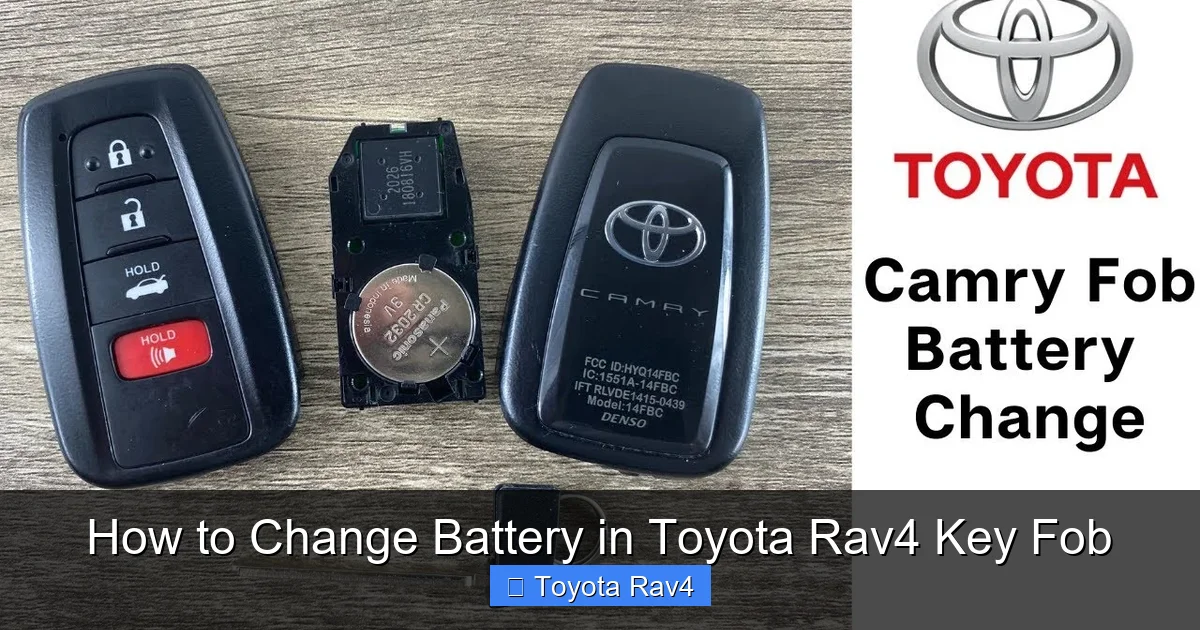
Visual guide about How to Change Battery in Toyota Rav4 Key Fob
Image source: i.ytimg.com
Common Signs of a Dying Battery
- Reduced range: You need to be closer to your vehicle for the key fob to work.
- Delayed response: There’s a noticeable lag between pressing a button and the car reacting.
- Weak or no LED light: The small light on the fob doesn’t flash or flashes dimly.
- Intermittent function: Some buttons work sometimes but not others.
- Car won’t recognize the fob: The vehicle doesn’t respond at all, even when the fob is near the door handle.
If you notice any of these issues, it’s time to check the battery. Don’t wait until the fob stops working entirely—proactive replacement ensures you’re never locked out or unable to start your car.
How Often Should You Replace the Battery?
While there’s no strict schedule, it’s a good idea to replace the battery every 3 to 4 years as preventive maintenance. If your RAV4 is older or you’ve had the same key fob for several years, consider replacing the battery even if it seems to be working fine. This is especially true if you live in extreme climates—hot summers or cold winters can accelerate battery drain.
Another tip: Keep a spare CR2032 battery in your glove compartment or emergency kit. That way, if your key fob dies unexpectedly, you’re prepared. It’s a small investment that can prevent a major inconvenience.
What You’ll Need to Change the Battery
One of the best things about changing the battery in your Toyota RAV4 key fob is that you don’t need a toolkit or special equipment. Most of what you need is likely already in your home. Here’s a quick checklist to make sure you’re ready:
Essential Items
- CR2032 3V lithium battery: This is the standard battery used in most Toyota key fobs. You can find it at drugstores, electronics stores, or online. A pack of two or three is a smart buy.
- Small flathead screwdriver or butter knife: Used to gently pry open the key fob casing. Avoid using anything too sharp or metal-heavy, as it could scratch or damage the plastic.
- Clean, dry workspace: A flat surface like a table or countertop where you can lay out the parts without losing them.
- Soft cloth or paper towel: To wipe your hands and keep the workspace clean.
Optional but Helpful
- Tweezers: Useful for handling the small battery, especially if your fingers are large.
- Magnifying glass: Helps if you have trouble seeing small components.
- Flashlight: Good lighting makes the process easier, especially if you’re working in a dim area.
Before you begin, make sure your hands are clean and dry. Oils and moisture can interfere with the electrical contacts inside the fob. Also, avoid working on carpeted surfaces—small parts like the battery can easily get lost.
Step-by-Step Guide to Changing the Battery
Now that you’re prepared, let’s get into the actual process. Changing the battery in your Toyota RAV4 key fob is straightforward, but it’s important to go slowly and carefully to avoid damaging the fob. Follow these steps exactly, and you’ll have a working key fob in under five minutes.
Step 1: Locate the Battery Compartment
Most Toyota RAV4 key fobs have a two-piece plastic casing that snaps together. The battery compartment is usually on the back or side of the fob. Look for a small seam running around the edge of the fob—this is where the two halves meet. Some models have a small indentation or notch that makes it easier to insert a tool.
Note: The exact design may vary slightly depending on your RAV4’s model year. For example, 2013–2018 models often have a horizontal seam, while 2019 and newer models may have a vertical seam. If you’re unsure, consult your owner’s manual or look up your specific model online.
Step 2: Open the Key Fob Casing
Take your flathead screwdriver or butter knife and gently insert it into the seam. Start at one end and slowly work your way around the edge, applying even pressure. The goal is to pop the clips that hold the two halves together—don’t force it.
As you go, you’ll hear soft clicking sounds as each clip releases. Once all clips are loose, the two halves should separate easily. If one side won’t budge, double-check that you’ve released all the clips. Never use excessive force—this can crack the plastic and ruin the fob.
Step 3: Remove the Old Battery
Once the casing is open, you’ll see the battery seated in a small circular compartment. It’s usually held in place by a metal bracket or spring clip. Use your screwdriver or tweezers to gently lift the battery out. Be careful not to touch the circuit board or other electronic components with metal tools—this could cause a short circuit.
Take note of how the battery is positioned—most CR2032 batteries have the positive (+) side facing up. This orientation is important when installing the new battery. If you’re unsure, take a quick photo with your phone before removing the old one.
Step 4: Insert the New Battery
Take your new CR2032 battery and place it into the compartment with the positive (+) side facing up, matching the orientation of the old battery. Press it gently into place until it sits flat and secure. The metal clip should hold it firmly.
Avoid touching the battery with your fingers as much as possible—oils from your skin can reduce its lifespan. If you do touch it, wipe it clean with a dry cloth before inserting.
Step 5: Reassemble the Key Fob
Carefully align the two halves of the key fob and press them together. Start at one end and work your way around, making sure all clips snap back into place. You should hear a series of soft clicks as the casing seals.
Once fully closed, check that there are no gaps between the halves. A properly sealed fob is more resistant to dust and moisture. If the fob feels loose or doesn’t click shut, reopen it and double-check the alignment.
Step 6: Test the Key Fob
Now it’s time to test your work. Stand near your RAV4 and press each button—lock, unlock, trunk release, and panic alarm. The LED light should flash brightly with each press, and the car should respond immediately.
If a button doesn’t work, reopen the fob and check that the battery is seated correctly. Sometimes a slight misalignment can prevent contact. Also, make sure the circuit board wasn’t damaged during disassembly.
Troubleshooting Common Issues
Even with careful handling, things can sometimes go wrong. Here are a few common problems and how to fix them:
The Key Fob Won’t Open
If you can’t get the casing to separate, double-check that you’re inserting the tool into the correct seam. Some fobs have a hidden release mechanism or require a specific angle. Try rotating the fob and applying pressure from different sides. If it still won’t open, consult your owner’s manual or look for a model-specific tutorial online.
The New Battery Doesn’t Work
First, confirm that the battery is inserted with the correct polarity. If the positive side is down, it won’t make contact. Also, check that the battery isn’t defective—try it in another device if possible. Finally, inspect the battery contacts inside the fob for dirt or corrosion. Clean them gently with a cotton swab and rubbing alcohol if needed.
The Fob Works but Has Reduced Range
A new battery should restore full range. If the fob still has limited reach, the issue may not be the battery. Check for interference from other electronic devices, or consider having the fob reprogrammed at a dealership. In rare cases, the internal antenna may be damaged.
The Casing Won’t Snap Back Together
This usually means a clip is misaligned or broken. Carefully realign the halves and press firmly. If a clip is broken, the fob may still function, but it could be less secure. In that case, consider replacing the entire fob or using a small piece of tape to hold it together temporarily.
Tips for Maintaining Your Key Fob
Once your new battery is in, a little maintenance can go a long way in extending its life and performance.
Keep It Clean
Wipe the exterior of your key fob regularly with a damp cloth to remove dirt and grime. Avoid using harsh chemicals or submerging the fob in water—even though it’s somewhat water-resistant, prolonged exposure can damage the electronics.
Avoid Extreme Temperatures
Don’t leave your key fob in direct sunlight or in a freezing car for long periods. Extreme heat can warp the plastic, while cold can drain the battery faster. Store it in a cool, dry place when not in use.
Use a Key Fob Cover
A silicone or leather cover can protect your fob from scratches, drops, and moisture. It also makes it easier to grip and less likely to get lost in a bag or pocket.
Replace Batteries Before They Die
As mentioned earlier, proactive replacement is better than emergency fixes. Mark the date of your last battery change on the fob with a small sticker or in your phone’s calendar. That way, you’ll know when it’s time for the next one.
When to Seek Professional Help
While changing the battery is a simple DIY task, there are times when you might need professional assistance.
The Fob Still Doesn’t Work After Battery Replacement
If you’ve followed all steps correctly and the key fob still doesn’t function, the issue may be internal damage or a faulty circuit board. In this case, visit a Toyota dealership or authorized service center. They can diagnose the problem and, if needed, reprogram or replace the fob.
You’ve Lost or Damaged the Fob
If your key fob is lost, stolen, or physically damaged (cracked casing, broken buttons), you’ll need a replacement. Toyota dealerships can provide new fobs and program them to your vehicle. Be prepared to provide proof of ownership and your vehicle’s VIN.
Multiple Fobs Aren’t Working
If all your key fobs stop working at the same time, the issue may be with the vehicle’s receiver or antenna, not the fobs themselves. A technician can run a diagnostic to identify the root cause.
Conclusion
Changing the battery in your Toyota RAV4 key fob is a quick, easy, and money-saving task that every owner should know how to do. With just a CR2032 battery and a small tool, you can restore full functionality to your fob in minutes—no dealership visit required.
By recognizing the signs of a dying battery, using the right tools, and following the steps carefully, you’ll keep your key fob working reliably for years to come. Plus, regular maintenance and proactive replacement can prevent unexpected issues down the road.
So the next time your key fob starts acting up, don’t panic. Grab a new battery, follow this guide, and get back to enjoying the convenience and security your RAV4 was designed to provide.
Frequently Asked Questions
What type of battery does a Toyota RAV4 key fob use?
Most Toyota RAV4 key fobs use a CR2032 3V lithium coin cell battery. This is a common, widely available battery found in electronics stores, pharmacies, and online retailers.
Can I use a different battery if I don’t have a CR2032?
No, you should only use a CR2032 battery. Other batteries may have different voltages or sizes, which can damage the key fob or cause it to malfunction.
Do I need to reprogram the key fob after changing the battery?
No, replacing the battery does not require reprogramming. The fob’s memory is retained, and it should work immediately after the new battery is installed.
How long does a key fob battery last?
Typically, a key fob battery lasts 3 to 5 years, depending on usage and environmental factors like temperature and frequency of use.
What if my key fob still doesn’t work after replacing the battery?
Check the battery orientation and ensure it’s seated properly. If it still doesn’t work, the fob may have internal damage and should be inspected by a professional.
Can I change the battery myself, or do I need a mechanic?
Yes, you can easily change the battery yourself. It’s a simple DIY task that requires no special skills or tools—just a new battery and a small flathead screwdriver.