
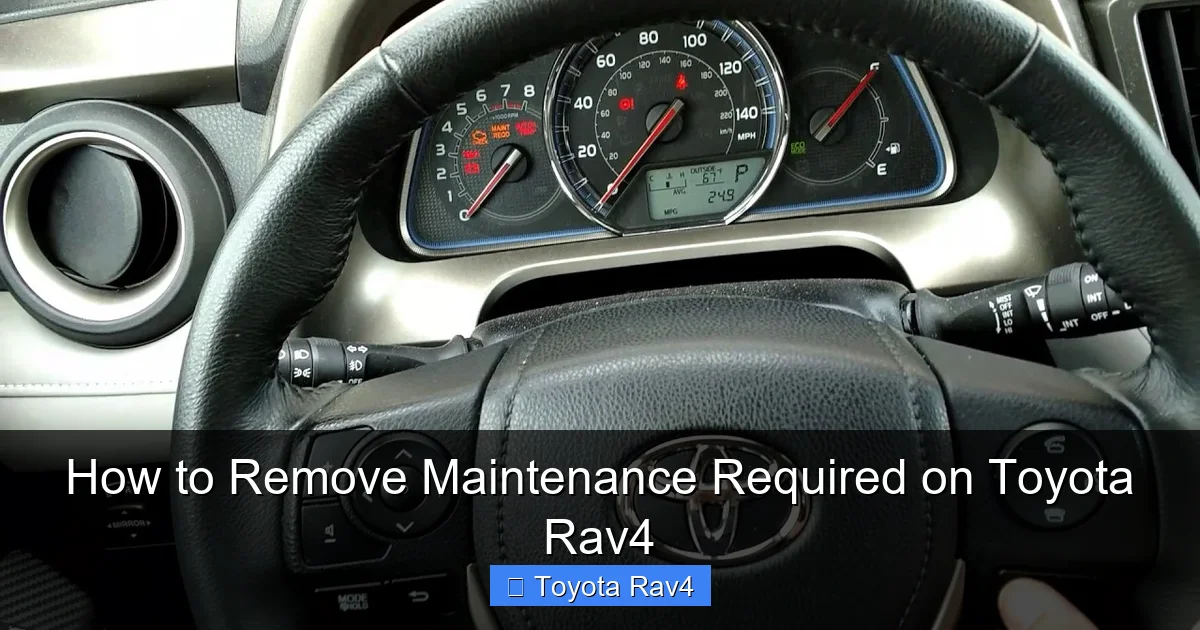
Removing the “Maintenance Required” light on your Toyota RAV4 is easier than you think. With just a few button presses or a quick trip to your mechanic, you can reset the reminder and stay on top of your vehicle’s service schedule.
Key Takeaways
- Understand the purpose of the light: The “Maintenance Required” indicator is a reminder, not a warning. It signals it’s time for routine service like oil changes or tire rotations.
- Know your model year: Reset procedures differ slightly between older (pre-2019) and newer (2019+) RAV4 models. Always check your owner’s manual first.
- Use the trip meter method for older models: On 2006–2018 RAV4s, you can reset the light using the trip odometer button and ignition key.
- Use the steering wheel controls for newer models: From 2019 onward, use the menu on the multi-information display (MID) to reset the maintenance light.
- Complete the required service first: Always perform the recommended maintenance before resetting the light to avoid skipping important care.
- Visit a dealer if unsure: If the light won’t turn off or you’re uncomfortable doing it yourself, a Toyota technician can reset it quickly.
- Keep records: Document each service and reset to maintain your vehicle’s value and warranty coverage.
[FEATURED_IMAGE_PLACEHOLDER]
Introduction: What Does the “Maintenance Required” Light Mean?
So, you’re driving your Toyota RAV4, enjoying the smooth ride and great fuel economy, when suddenly—a little light pops up on your dashboard. It says “Maintenance Required.” Your first thought might be, “Uh-oh, is something wrong?” But don’t panic. This light isn’t a warning that your SUV is about to break down. Instead, it’s simply a friendly reminder from Toyota that it’s time for routine maintenance.
Think of it like your phone reminding you to charge it. It’s not broken—it just needs a little attention to keep running well. The “Maintenance Required” light is part of Toyota’s Maintenance Reminder System, designed to help you stay on top of regular service intervals. These typically include oil changes, tire rotations, brake inspections, and fluid top-offs. Ignoring it won’t cause immediate damage, but skipping maintenance can lead to bigger problems down the road—like reduced fuel efficiency, engine wear, or even costly repairs.
The good news? Resetting this light is simple, and you don’t need to be a mechanic to do it. Whether you’ve just changed your oil at home or had your RAV4 serviced at a dealership, you can clear the reminder yourself in just a few minutes. In this guide, we’ll walk you through exactly how to remove the maintenance required on your Toyota RAV4—step by step, model by model. No jargon, no confusion—just clear, practical advice so you can get back to driving with confidence.
Why the Maintenance Light Comes On
Before we dive into how to reset the light, it’s important to understand why it comes on in the first place. The “Maintenance Required” indicator isn’t triggered by a problem with your engine or transmission. Instead, it’s based on mileage and time. Toyota programs your RAV4’s computer to track how far you’ve driven and how long it’s been since the last service. Once you hit a certain threshold—usually every 5,000 to 10,000 miles, depending on your driving habits and oil type—the system flips the switch and lights up the dashboard.
This system is designed to promote preventive care. Regular maintenance helps your RAV4 run efficiently, last longer, and retain its value. For example, changing your oil on time prevents sludge buildup, which can clog engine passages and reduce performance. Rotating your tires ensures even wear, so you don’t end up replacing them prematurely. And checking brake fluid and coolant levels helps avoid overheating or brake failure.
It’s also worth noting that the light doesn’t distinguish between types of maintenance. Whether you need an oil change, a tire rotation, or a full inspection, the message is the same: “Hey, it’s time to check things out.” That’s why it’s crucial to follow your owner’s manual’s recommended service schedule. Toyota provides a detailed maintenance plan based on normal or severe driving conditions—like frequent short trips, towing, or driving in dusty areas. If you’re not sure what’s due, check the manual or ask your service advisor.
Another common question is: “Can I ignore the light?” Technically, yes—but it’s not smart. While the RAV4 won’t stop running just because the light is on, delaying maintenance can lead to bigger issues. For instance, old oil breaks down and loses its ability to lubricate the engine, which can cause overheating or increased wear. Similarly, worn brake pads can damage rotors, leading to expensive replacements. So while the light itself isn’t dangerous, ignoring what it represents can be.
How the System Works
Toyota’s Maintenance Reminder System uses a combination of mileage and time to determine when to activate the light. The computer tracks your odometer reading and compares it to the last reset point. It also considers how long it’s been since the last service, even if you haven’t driven much. This is especially helpful for people who don’t drive often—your car still needs attention, even if the mileage is low.
The system is programmed to trigger the light at specific intervals. For most RAV4 models, this is every 5,000 miles for severe driving conditions or every 10,000 miles for normal driving. However, if you use synthetic oil, Toyota may extend the interval to 10,000 miles or more. Always refer to your owner’s manual for the exact schedule for your vehicle.
Once the light comes on, it will stay on until you reset it—even if you’ve already completed the service. That’s why resetting the light is an important step. It tells the computer, “Okay, I’ve done the work. Start counting again.” Without resetting, the light will remain on, which can be annoying and may cause you to overlook a real issue in the future.
Common Misconceptions
There are a few myths about the “Maintenance Required” light that are worth clearing up. First, it’s not the same as the “Check Engine” light. The Check Engine light indicates a potential problem with the engine, emissions, or other critical systems. It requires immediate attention. The Maintenance Required light, on the other hand, is just a reminder—like a calendar notification.
Second, the light doesn’t mean your car is unsafe to drive. You can continue driving normally until you’re able to complete the service. However, it’s best not to delay too long, especially if you’re due for an oil change or brake inspection.
Finally, some people think the light will reset itself after a certain number of miles. It won’t. You have to manually reset it using one of the methods we’ll cover below. If you don’t, the light will stay on, and you’ll have to deal with it later.
How to Reset the Maintenance Light on Older Toyota RAV4 Models (2006–2018)
If you drive a Toyota RAV4 from 2006 to 2018, you’re in luck—resetting the “Maintenance Required” light is a straightforward process that you can do yourself in under a minute. No special tools or diagnostic equipment needed. All you need is your ignition key and the trip odometer button on your dashboard.
This method works by accessing the vehicle’s maintenance reset mode through the trip meter. It’s a simple sequence of turning the key and pressing the trip button at the right time. Let’s walk through it step by step.
Step-by-Step Reset Procedure
1. Turn the ignition to the “ON” position.
Insert your key and turn it to the “ON” position, but don’t start the engine. You should see the dashboard lights come on, including the “Maintenance Required” light. If the light isn’t on, this method won’t work—it only resets when the light is active.
2. Locate the trip odometer button.
This is usually a small button near the speedometer, labeled “TRIP” or “ODO/TRIP.” It’s used to switch between trip A, trip B, and total mileage.
3. Press and hold the trip button.
While holding the trip button, turn the ignition back to the “OFF” position. Keep holding the button.
4. Turn the ignition back to “ON” while still holding the trip button.
Now, turn the key to “ON” again (still not starting the engine) and continue holding the trip button. You’ll see the “Maintenance Required” light begin to flash.
5. Wait for the light to turn off.
After about 5–10 seconds, the light will stop flashing and turn off completely. This means the reset is successful.
6. Release the trip button and turn off the ignition.
Once the light is off, you can release the button and turn the key to “OFF.” The next time you start the car, the light should be gone.
Tips for Success
– Timing is key. The sequence must be done in the correct order. If you mess up, just turn the ignition off and start over.
– Don’t start the engine. The reset only works when the engine is off and the ignition is in the “ON” position.
– Check your owner’s manual. While this method works for most 2006–2018 RAV4s, there may be slight variations depending on your exact model and trim.
What If the Light Won’t Turn Off?
If you follow the steps correctly and the light still won’t reset, there are a few possible reasons:
– The light wasn’t on to begin with. This method only works if the “Maintenance Required” light is already illuminated. If it’s not, the reset sequence won’t activate.
– You didn’t hold the button long enough. Make sure you hold the trip button the entire time, from turning the key off to turning it back on.
– The battery was recently disconnected. If you’ve recently disconnected the battery or had a dead battery, the system may need to be reset differently. In this case, try driving the car for a few miles—sometimes the light resets automatically after a drive cycle.
If none of these solutions work, it’s best to visit a Toyota dealership or trusted mechanic. They can use a diagnostic tool to reset the system manually.
How to Reset the Maintenance Light on Newer Toyota RAV4 Models (2019–Present)
Starting in 2019, Toyota updated the RAV4 with a new dashboard design and a more advanced multi-information display (MID). This means the old trip button method no longer works. Instead, you’ll use the steering wheel controls to navigate the menu and reset the maintenance light.
This method is a bit more involved, but still doable at home. It requires accessing the maintenance menu through the MID, which displays information like fuel economy, tire pressure, and service reminders. Let’s go through the process step by step.
Step-by-Step Reset Procedure
1. Turn the ignition to the “ON” position.
Press the “Start” button (or turn the key) to turn on the dashboard, but don’t start the engine. The MID should light up.
2. Use the steering wheel controls to access the menu.
On the left side of the steering wheel, you’ll find a set of buttons labeled with arrows and an “OK” button. Use the arrow buttons to scroll through the menu options.
3. Navigate to “Vehicle Settings.”
Scroll down until you see “Vehicle Settings” and press “OK.”
4. Select “Maintenance.”
In the Vehicle Settings menu, look for “Maintenance” and select it.
5. Choose “Reset.”
You’ll see an option to “Reset” the maintenance data. Select it.
6. Confirm the reset.
The system will ask if you’re sure you want to reset the maintenance light. Confirm by selecting “Yes.”
7. Turn off the ignition.
Once the reset is complete, turn off the ignition. The next time you start the car, the “Maintenance Required” light should be gone.
Tips for Success
– Make sure the light is on. Like the older method, this only works if the maintenance light is already illuminated.
– Don’t rush. Take your time navigating the menu. If you go too fast, you might miss the correct option.
– Check your owner’s manual. The exact menu labels may vary slightly depending on your RAV4’s trim level and infotainment system.
What If the Menu Option Isn’t There?
If you can’t find the “Maintenance” or “Reset” option in the menu, it could be because:
– The light isn’t on. The reset option only appears when the maintenance light is active.
– You’re in the wrong menu. Make sure you’re in “Vehicle Settings,” not “Audio” or “Navigation.”
– Your model has a different system. Some hybrid or higher-trim RAV4s may have slightly different menus. Consult your owner’s manual for model-specific instructions.
If you’re still stuck, a quick visit to a Toyota service center can resolve the issue in minutes.
When to Visit a Mechanic or Dealership
While most RAV4 owners can reset the maintenance light at home, there are times when it’s best to let the professionals handle it. Here are a few scenarios where a trip to the mechanic or dealership makes sense.
The Light Won’t Reset After Multiple Attempts
If you’ve tried the reset procedure several times and the light still won’t turn off, there may be an underlying issue. It’s possible that the vehicle’s computer isn’t recognizing the reset command, or there’s a glitch in the system. A technician can use a diagnostic scanner to clear the code and ensure the system is working properly.
You’re Uncomfortable Doing It Yourself
Not everyone feels confident working with their car’s dashboard or menu systems. If you’re nervous about pressing the wrong button or damaging something, it’s perfectly okay to let a professional do it. Most dealerships will reset the light for free if you’ve had service done there.
You’re Due for Major Service
If your RAV4 is due for more than just an oil change—like a transmission service, brake fluid flush, or timing belt replacement—it’s a good idea to have a mechanic inspect everything. They can perform the service and reset the light in one visit, giving you peace of mind.
You’re Preparing to Sell Your RAV4
When selling a used car, a clean dashboard and up-to-date maintenance records can increase its value. A dealership can provide a full inspection, complete any needed services, and reset the light to show potential buyers that the vehicle has been well cared for.
Tips for Maintaining Your Toyota RAV4
Resetting the maintenance light is just one part of keeping your RAV4 in top shape. To get the most out of your SUV, follow these practical tips for ongoing care.
Follow the Recommended Service Schedule
Your owner’s manual includes a detailed maintenance schedule based on mileage and time. Stick to it. Regular oil changes, tire rotations, and fluid checks will keep your RAV4 running smoothly for years.
Use Genuine Toyota Parts and Fluids
Toyota designs its vehicles to work best with genuine parts and fluids. Using aftermarket or low-quality products can reduce performance and void your warranty.
Keep Records
Document every service, including the date, mileage, and work performed. This helps you stay on track and adds value if you ever sell the vehicle.
Check Tire Pressure Monthly
Properly inflated tires improve fuel economy, handling, and tire life. Use a tire pressure gauge to check the pressure at least once a month.
Listen to Your Car
If you notice unusual noises, vibrations, or warning lights, don’t ignore them. Address issues early to avoid costly repairs.
Conclusion
Removing the “Maintenance Required” light on your Toyota RAV4 is a simple task that anyone can do. Whether you drive an older model with a trip button or a newer one with a digital menu, the process takes just a few minutes. More importantly, it’s a reminder to stay on top of routine maintenance—something that keeps your RAV4 reliable, efficient, and safe.
By understanding why the light comes on, knowing how to reset it, and following a regular service schedule, you’ll get the most out of your SUV. And if you ever run into trouble, don’t hesitate to visit a Toyota dealership. They’re there to help.
So the next time that little light pops up, don’t stress. Grab your owner’s manual, follow the steps, and get back to enjoying the open road.
FAQs
Can I drive my RAV4 with the maintenance light on?
Yes, you can safely drive your RAV4 with the “Maintenance Required” light on. It’s a reminder, not a warning. However, it’s best to complete the recommended service as soon as possible to avoid potential issues.
Will the maintenance light reset itself after an oil change?
No, the light will not reset automatically. You must manually reset it using the trip button method (older models) or the menu system (newer models), even after completing the service.
What if I reset the light but haven’t done the maintenance?
You can reset the light without doing the service, but it’s not recommended. The light is there to remind you of important care. Skipping maintenance can lead to engine wear, reduced fuel economy, or costly repairs.
Does the reset method work on all RAV4 models?
The trip button method works on 2006–2018 models, while the menu method works on 2019 and newer models. Always check your owner’s manual for model-specific instructions.
Can a mechanic reset the light for me?
Yes, any Toyota dealership or qualified mechanic can reset the maintenance light using a diagnostic tool. This is a quick and often free service if you’ve had work done there.
Why did the maintenance light come on so soon after my last service?
This could happen if the light wasn’t reset properly after the last service, or if you’re driving in severe conditions (like frequent short trips or towing). Check your service records and driving habits.
This is a comprehensive guide about how to remove maintenance required on toyota rav4.
Key Takeaways
- Understanding how to remove maintenance required on toyota rav4: Provides essential knowledge
Frequently Asked Questions
What is how to remove maintenance required on toyota rav4?
how to remove maintenance required on toyota rav4 is an important topic with many practical applications.