
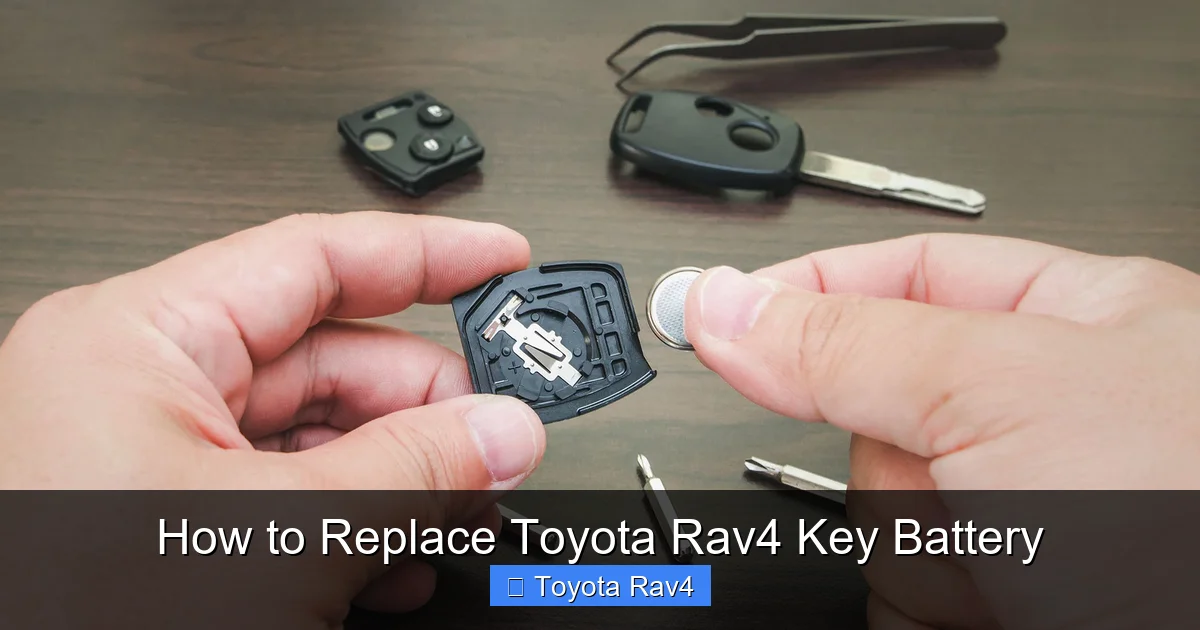
Replacing the Toyota RAV4 key battery is a simple DIY task that takes just minutes and costs under $5. With the right tools and a little patience, you can restore full functionality to your key fob without visiting a dealership.
Key Takeaways
- Know your key type: Toyota RAV4 keys come in different styles—mechanical, smart, and remote—each requiring a slightly different battery replacement method.
- Use the correct battery: Most RAV4 key fobs use a CR2032 3V lithium coin cell battery. Always check your owner’s manual or the old battery for confirmation.
- Gather the right tools: A small flathead screwdriver, plastic pry tool, or even a butter knife can help open the key casing safely.
- Handle with care: Avoid forcing the key open, as plastic clips can break. Work slowly and gently to prevent damage.
- Test after replacement: Always test all key functions—lock, unlock, panic, and trunk release—before reassembling fully.
- Reset if needed: Some models may require a quick re-sync after battery replacement. Follow simple steps to reconnect the key to the vehicle.
- Keep spare batteries on hand: Batteries last 3–5 years. Having a spare CR2032 ensures you’re never stranded with a dead key.
📑 Table of Contents
Why Your Toyota RAV4 Key Battery Might Be Dead
You’re heading out for a morning coffee run, press the unlock button on your Toyota RAV4 key fob—and nothing happens. The lights don’t flash. The doors stay locked. Your first thought? “Did I forget my keys?” But no, they’re right there in your hand. The real culprit? A dead key battery.
It’s a common issue, especially as your RAV4 ages. Key fobs rely on small lithium batteries to send signals to your vehicle. Over time, these batteries lose their charge, especially if the key is used frequently or left near electronic devices that cause interference. And while it might seem like a minor inconvenience, a dead key battery can leave you stranded—especially if you rely on keyless entry or push-button start.
The good news? Replacing the Toyota RAV4 key battery is one of the easiest and most cost-effective DIY fixes you can do at home. No special training, no trip to the dealership, and no $50 service fee. With just a few minutes and a $2 battery, you can have your key working like new again. In this guide, we’ll walk you through every step—from identifying your key type to testing the new battery—so you can get back on the road with confidence.
Identifying Your Toyota RAV4 Key Type
Before you start prying open your key fob, it’s important to know exactly what kind of key you have. Toyota has used several different key designs over the years for the RAV4, and the battery replacement process varies slightly depending on the model year and trim level.
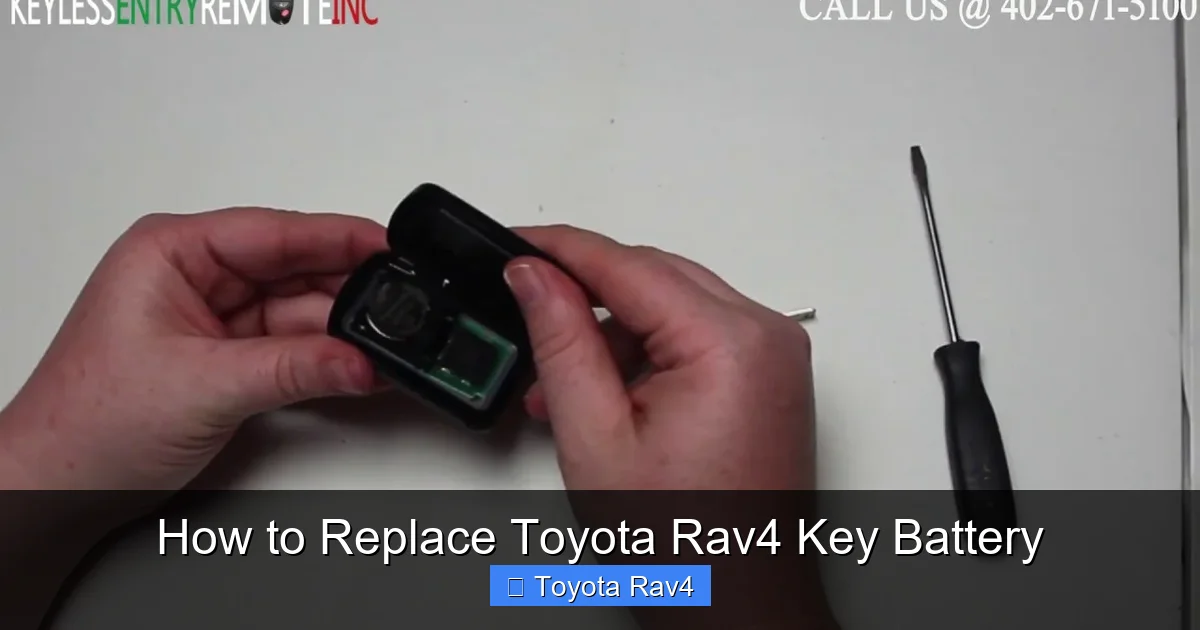
Visual guide about How to Replace Toyota Rav4 Key Battery
Image source: i.ytimg.com
Mechanical Key with Remote (Pre-2013 Models)
If your RAV4 was made before 2013, you likely have a traditional key fob with a physical key blade that slides out from the side. This type usually has a single button panel on the front and a small release button to eject the metal key. These keys are relatively simple to open and typically use a CR2032 battery.
Smart Key (2013–2018 Models)
Starting around 2013, Toyota introduced the smart key system for the RAV4. These keys are sleeker, often made of black or silver plastic, and feature multiple buttons including lock, unlock, panic, and trunk release. Some also have a “lock” button on the side for keyless entry. These keys are more compact and may require extra care when opening to avoid damaging internal components.
Remote Key with Integrated Blade (2019–Present)
Newer RAV4 models (2019 and later) often come with a remote key that has a fold-out metal blade. The key fob is larger and may have additional features like remote start or proximity sensors. These keys are designed for durability but still use the same CR2032 battery. The opening mechanism is usually a small latch or seam along the side.
To confirm your key type, check the back of the fob for a model number or look up your vehicle’s year and trim in the owner’s manual. You can also visit Toyota’s official website and enter your VIN to get detailed information about your key system.
Tools and Materials You’ll Need
One of the best things about replacing a Toyota RAV4 key battery is that you don’t need a full toolbox. In fact, most people already have everything they need at home. Here’s a quick checklist to make sure you’re prepared:
- CR2032 3V lithium battery: This is the most common battery used in Toyota key fobs. You can find them at drugstores, supermarkets, electronics stores, or online. A pack of two or three costs around $5–$7.
- Small flathead screwdriver: A standard 3–4mm flathead works well. Avoid using anything too sharp or metal-heavy, as it can scratch or damage the plastic.
- Plastic pry tool (optional but recommended): These are often included in phone repair kits and are perfect for gently separating plastic casings without leaving marks.
- Tweezers (optional): Helpful for handling the small battery, especially if your fingers are large or the compartment is tight.
- Clean cloth or paper towel: Use this to wipe down the inside of the key fob and keep dust out during the process.
Pro tip: If you don’t have a plastic pry tool, a butter knife, guitar pick, or even a thick plastic card (like an old gift card) can work in a pinch. Just be gentle—plastic clips inside the fob can break if forced.
Step-by-Step Guide to Replacing the Battery
Now that you’ve identified your key type and gathered your tools, it’s time to get to work. Follow these detailed steps to safely replace your Toyota RAV4 key battery. The process is similar across most models, but we’ll highlight key differences where they matter.
Step 1: Locate the Key Release Button or Seam
Most Toyota RAV4 key fobs have a small button or seam along the side or top edge. This is where you’ll begin separating the two halves of the fob. On older models, you’ll usually find a small button near the base of the key blade. Press it to release the metal key, then look for a seam running along the side of the fob.
On newer smart keys, the seam is often hidden along the top or side edge. Run your fingernail along the edges to feel for a slight gap. Avoid prying at random spots—this can crack the casing.
Step 2: Open the Key Fob Carefully
Once you’ve found the seam, insert your flathead screwdriver or plastic pry tool into the gap. Gently twist the tool to create a small opening. Work your way around the edge, applying even pressure. The two halves are held together by plastic clips, so don’t force it. If it doesn’t open easily, double-check that you’re at the right seam.
For keys with a fold-out blade, you may need to fully extend the metal key first before opening the fob. This gives you better access to the internal compartment.
Step 3: Remove the Old Battery
Once the fob is open, you’ll see the battery seated in a small circular compartment. It’s usually held in place by a metal clip or plastic rim. Use your screwdriver or tweezers to gently lift the battery out. Note the orientation—most batteries have the positive (+) side facing up, but this can vary. Take a quick photo with your phone before removing it to remember the correct position.
Dispose of the old battery properly. Lithium batteries should not be thrown in regular trash. Many stores (like Best Buy or Home Depot) have battery recycling bins, or you can check with your local waste management service.
Step 4: Insert the New Battery
Take your new CR2032 battery and place it into the compartment with the correct orientation. The positive (+) side usually faces up, but again, refer to your photo or the markings inside the fob. Press it down gently until it sits securely in place. You should feel a slight click or resistance when it’s properly seated.
Avoid touching the battery with bare fingers if possible. Oils from your skin can reduce battery life. If you do touch it, wipe it clean with a dry cloth before inserting.
Step 5: Reassemble the Key Fob
Carefully align the two halves of the fob and press them together. Start at one end and work your way around, making sure all clips snap back into place. You should hear a series of soft clicks as the pieces reconnect. Avoid using excessive force—if it doesn’t close easily, check that the battery is properly seated and nothing is blocking the closure.
Once closed, test the key by pressing each button. If the lights flash or the car responds, you’re good to go. If not, reopen the fob and double-check the battery orientation and connection.
Troubleshooting Common Issues
Even with careful handling, things don’t always go perfectly. Here are some common problems you might encounter—and how to fix them.
Key Fob Won’t Work After Battery Replacement
If your key still doesn’t work after replacing the battery, the first thing to check is the battery orientation. A reversed battery won’t send any signal. Also, make sure the battery is fully seated and the contacts are clean. Dust or debris can interfere with the connection.
In some cases, the key may need to be re-synced with the vehicle. This is especially true for smart keys. To re-sync, try this simple method: Stand close to your RAV4, press and hold the lock and unlock buttons simultaneously for 10–15 seconds. Then press the lock button once. The doors should lock and unlock, confirming the connection.
Cracked or Broken Plastic Clip
If you accidentally break a plastic clip while opening the fob, don’t panic. The key may still function, but it could feel loose. You can use a small drop of super glue to reattach the clip, but be very careful not to get glue on the battery or internal components. Alternatively, some people use a small piece of electrical tape around the edge to hold the fob together temporarily.
Buttons Feel Stiff or Unresponsive
After reassembly, the buttons might feel stiff or not click properly. This is often due to misalignment of the internal button pad. Open the fob again and check that the rubber button contacts are properly seated over the circuit board. Press each button gently to ensure they move freely.
Battery Drains Quickly
If your new battery dies within weeks, there could be an issue with the key fob itself. A short circuit or faulty component can drain the battery rapidly. In this case, it’s best to visit a Toyota dealer or locksmith for diagnosis. They can test the fob and determine if it needs repair or replacement.
Tips for Maintaining Your Toyota RAV4 Key Fob
Replacing the battery is just one part of keeping your key fob in top shape. With a little care, you can extend its life and avoid future issues.
Keep It Clean
Dirt, grease, and moisture can build up inside the key fob over time, especially if you carry it in your pocket or purse. Every few months, wipe the exterior with a damp cloth and dry it thoroughly. Avoid using harsh chemicals or submerging the fob in water.
Avoid Extreme Temperatures
Leaving your key in a hot car or exposing it to freezing temperatures can damage the internal electronics and shorten battery life. Try to store your key in a cool, dry place when not in use.
Use a Key Cover
A silicone or leather key cover can protect your fob from drops, scratches, and moisture. It also makes it easier to grip and less likely to slip out of your hand.
Replace Batteries Proactively
Don’t wait until the key stops working. Most CR2032 batteries last 3–5 years. If your RAV4 is more than three years old, consider replacing the battery as part of regular maintenance—even if it still works. This prevents unexpected failures.
Keep a Spare Key
If your RAV4 came with two keys, keep the spare in a safe place at home. If you only have one key, consider getting a duplicate made and programmed. This ensures you’re never locked out if the primary key fails.
When to Seek Professional Help
While replacing the battery is a simple task, there are times when it’s best to consult a professional.
Damaged Key Fob
If your key fob is cracked, water-damaged, or the buttons are unresponsive even after battery replacement, it may need professional repair or replacement. Toyota dealers can order genuine replacement fobs and program them to your vehicle.
Programming Issues
Some newer RAV4 models require specialized equipment to program a new key. If you’ve lost your only key or need a duplicate, a locksmith or dealership will need to sync the new fob with your car’s immobilizer system.
Warranty Concerns
If your RAV4 is still under warranty, check the terms before attempting DIY repairs. While battery replacement is generally safe, some warranties may be voided if unauthorized modifications are made.
In most cases, though, replacing the battery yourself is safe, cost-effective, and doesn’t affect your warranty. Just be sure to use genuine or high-quality replacement parts.
Conclusion
Replacing the Toyota RAV4 key battery is a quick, easy, and money-saving task that every owner should know how to do. With just a few minutes and a $2 battery, you can restore full functionality to your key fob and avoid the hassle of a dealership visit. Whether you have an older mechanical key or a sleek smart fob, the process is straightforward when you follow the right steps.
Remember to identify your key type, use the correct CR2032 battery, and handle the fob with care. Test all functions after replacement, and keep spare batteries on hand for future use. With proper maintenance, your key fob will serve you reliably for years to come.
So next time your RAV4 key starts acting up, don’t panic—just grab a screwdriver and a new battery. You’ve got this.
Frequently Asked Questions
What battery does a Toyota RAV4 key fob use?
Most Toyota RAV4 key fobs use a CR2032 3V lithium coin cell battery. This is a standard size used in many electronic devices. Always check your owner’s manual or the old battery to confirm.
How often should I replace my RAV4 key battery?
The battery typically lasts 3–5 years, depending on usage. If you notice the range decreasing or buttons becoming less responsive, it’s time for a replacement.
Can I replace the battery myself, or do I need a dealer?
Yes, you can easily replace the battery at home with basic tools. No dealership visit is required unless the key is damaged or needs reprogramming.
Will replacing the battery reset my key fob?
Usually not, but some smart keys may need a quick re-sync. Try pressing and holding the lock and unlock buttons near the vehicle to reconnect.
What if my key fob still doesn’t work after battery replacement?
Check the battery orientation and ensure it’s properly seated. If it still doesn’t work, the fob may be damaged or need professional programming.
Can I use a different battery type?
No, always use a CR2032 battery. Using the wrong type can damage the key fob or cause it to malfunction.