
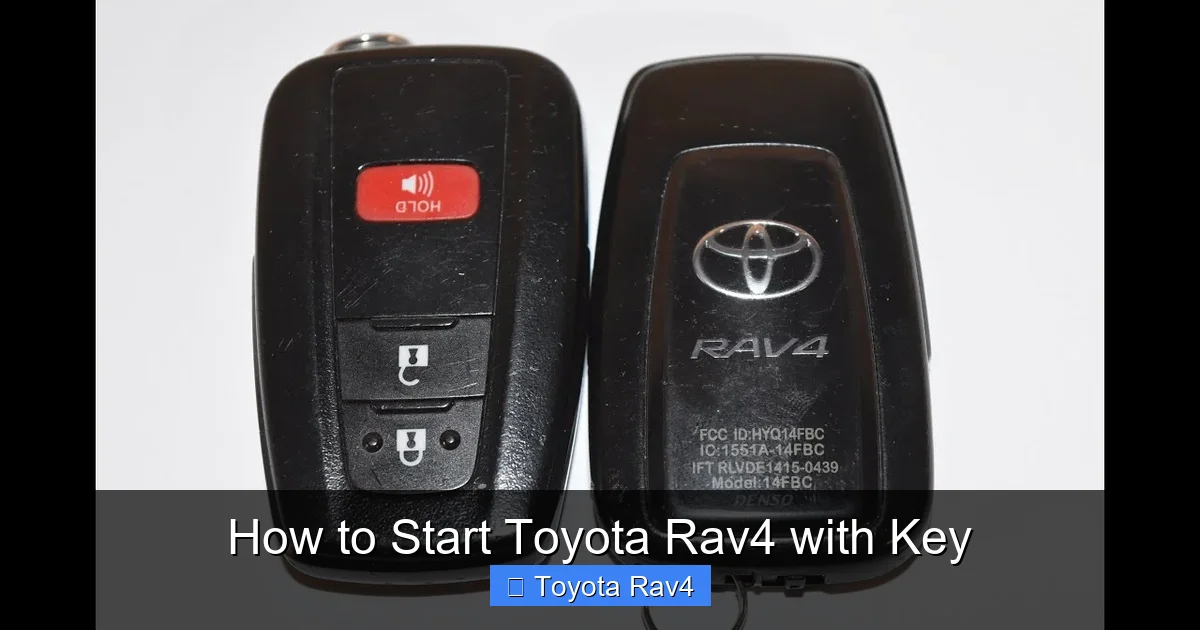
Starting your Toyota RAV4 with a key is simple once you know the right steps—whether you’re using a physical key, smart fob, or push-button ignition. This guide covers everything from older models with traditional keys to newer ones with advanced keyless systems, ensuring you can get behind the wheel safely and confidently.
Starting your Toyota RAV4 with a key might seem straightforward—but if you’re new to the vehicle or switching from a different car brand, it can be confusing. Whether you’re driving a 2005 RAV4 with a traditional metal key or a 2023 model with a sleek smart fob and push-button ignition, the process isn’t always obvious. The good news? Once you understand the basics, starting your RAV4 becomes second nature.
Toyota has evolved its key and ignition systems over the years, blending convenience with security. Older models rely on a physical key turned in an ignition cylinder, while newer ones use advanced keyless entry and start systems. Despite these differences, the core principle remains the same: your key must be authenticated by the vehicle before the engine will fire up. This guide will walk you through every step, no matter which RAV4 you drive. We’ll cover traditional keys, smart fobs, emergency procedures, and troubleshooting tips—so you’re never left stranded.
Key Takeaways
- Know your RAV4 model year: Starting procedures vary between older models with physical keys and newer ones with smart key fobs and push-button ignitions.
- Locate the key fob or physical key: Always ensure your key is within range (for smart keys) or inserted properly (for traditional keys) before attempting to start the vehicle.
- Press the brake pedal: For push-button start systems, you must press the brake pedal before pressing the start button to activate the engine.
- Use the emergency key blade if needed: If your smart fob battery dies, use the hidden mechanical key to unlock the door and start the car manually.
- Check for warning lights: If the engine doesn’t start, look at the dashboard for alerts like “Key Not Detected” or “Check Engine” that may indicate a problem.
- Keep your key fob charged: Replace the key fob battery regularly to avoid being stranded due to a dead remote.
- Consult your owner’s manual: Always refer to your specific RAV4 model’s manual for detailed instructions and troubleshooting tips.
📑 Table of Contents
Understanding Your Toyota RAV4 Key System
Before you can start your RAV4, it’s important to know what kind of key system your vehicle uses. Toyota has gradually transitioned from mechanical keys to electronic smart keys, and understanding the difference will save you time and frustration.
Traditional Key (Pre-2006 Models)
If you own a RAV4 from 2005 or earlier, you likely have a standard metal key. This key fits into a physical ignition cylinder located on the right side of the steering column. To start the car, you insert the key and turn it clockwise through several positions: “Lock,” “Acc” (Accessories), “On” (Ignition), and finally “Start.” The engine cranks and starts when you reach the “Start” position, and you release the key to let it spring back to “On.”
These older models are simple and reliable, but they lack the convenience features of modern systems. There’s no remote locking, no push-button start, and no keyless entry. However, they’re also less prone to electronic glitches. If your key is worn or damaged, it may not turn smoothly—so keep it clean and consider getting a spare made.
Smart Key Fob (2006 and Newer Models)
Starting with the 2006 model year, Toyota introduced the smart key fob for the RAV4. This small, rectangular remote contains a microchip that communicates with your vehicle via radio frequency. As long as the fob is inside the car (usually in your pocket or purse), you can unlock the doors by touching the handle and start the engine with the push of a button.
The smart key system includes several features:
– **Keyless entry:** Touch the door handle to lock or unlock.
– **Push-button ignition:** Press the “Start/Stop” button to turn the engine on or off.
– **Panic alarm:** Press and hold the panic button to trigger the horn and lights.
– **Remote trunk release:** Some models allow you to open the rear hatch remotely.
The fob also contains a hidden mechanical key blade, which can be used to unlock the driver’s door if the battery dies or the electronics fail.
Hybrid and Plug-in Hybrid RAV4 Models
If you drive a RAV4 Hybrid or RAV4 Prime (plug-in hybrid), the starting process is nearly identical to the gas-only models—but with a few key differences. Hybrid vehicles use an electric motor to assist the gasoline engine, and they often start silently. You may not hear the typical engine crank, especially when the car is in EV mode.
To start a hybrid RAV4:
1. Ensure the key fob is inside the vehicle.
2. Press the brake pedal firmly.
3. Press the “Power” or “Start/Stop” button.
The dashboard will light up, and you’ll hear a soft beep or see a “Ready” indicator on the display. The engine may not start immediately if the battery has enough charge—this is normal. The gas engine will kick in when needed, such as during acceleration or when the battery is low.
Step-by-Step Guide: How to Start Toyota RAV4 with Key
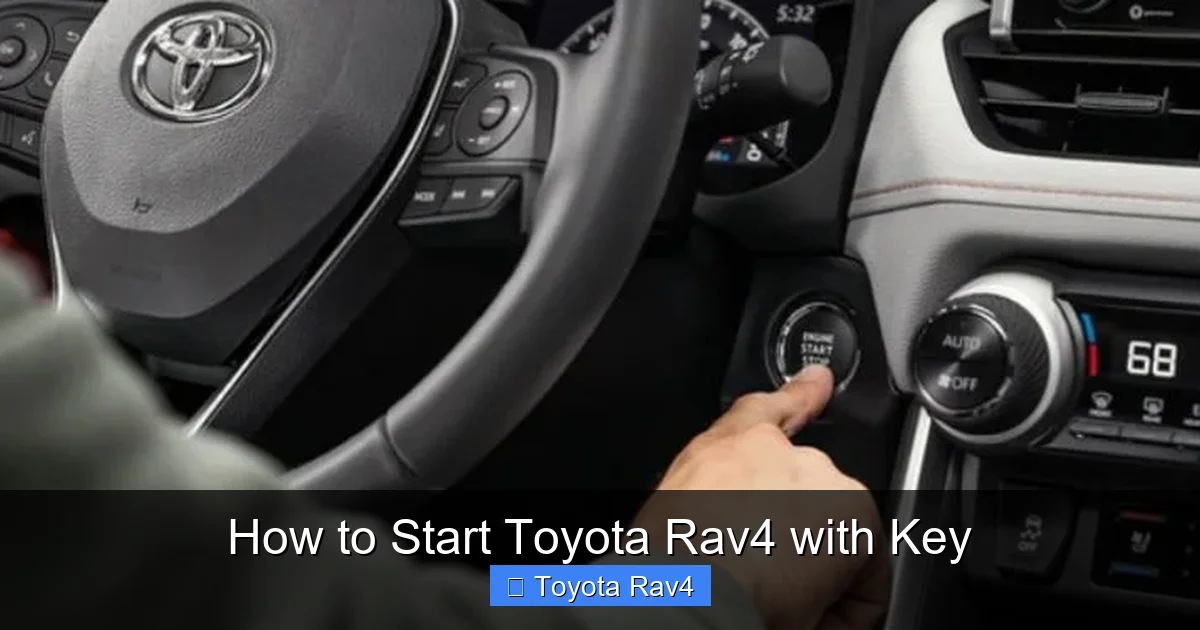
Visual guide about How to Start Toyota Rav4 with Key
Image source: earnhardttoyota.com
Now that you understand the different key systems, let’s walk through the actual process of starting your RAV4. Whether you’re using a traditional key or a smart fob, these steps will get you on the road safely.
Starting a RAV4 with a Traditional Key
If your RAV4 has a physical ignition cylinder, follow these steps:
1. **Insert the key:** Slide the metal key into the ignition slot on the right side of the steering column. Make sure it’s fully inserted.
2. **Turn to “Acc”:** Turn the key clockwise to the first position. This powers the accessories (radio, lights, etc.) but doesn’t start the engine.
3. **Turn to “On”:** Continue turning to the next position. The dashboard lights will illuminate, and the engine control system will initialize.
4. **Start the engine:** Turn the key fully to the “Start” position. You’ll hear the starter motor crank the engine. Once the engine fires up, release the key—it will automatically return to the “On” position.
5. **Check the dashboard:** Ensure no warning lights (like “Check Engine” or “Oil Pressure”) remain on. If they do, consult your owner’s manual.
Tip: If the key feels stiff or won’t turn, don’t force it. Try jiggling the steering wheel slightly—sometimes the steering lock engages and prevents the key from turning. Also, avoid hanging heavy items on your keychain, as this can wear out the ignition cylinder over time.
Starting a RAV4 with a Smart Key Fob
For RAV4 models with push-button ignition, the process is even simpler—but requires a few key actions:
1. **Ensure the fob is inside the vehicle:** The smart key must be within range (usually inside the cabin) for the system to recognize it. If you get a “Key Not Detected” message, try holding the fob near the start button or placing it in the designated fob pocket (often in the center console).
2. **Press the brake pedal:** This is critical. Unlike older cars, you must press the brake pedal firmly before the engine will start. If you only press the start button without braking, the car will enter “Accessory” mode (lights and radio on, but engine off).
3. **Press the Start/Stop button:** With your foot on the brake, press the button once. The engine will crank and start. On hybrid models, you may not hear a loud noise—just a soft whir and dashboard lights.
4. **Listen for the “Ready” signal:** In hybrids, look for a “Ready” light on the dashboard. This confirms the vehicle is operational, even if the gas engine isn’t running yet.
Pro tip: If your fob battery is low, the car may still start—but you might need to hold the fob directly against the start button. Most RAV4 models have a backup method: look for a small indentation or symbol near the button. Place the fob there and press the button to start the car.
Starting a RAV4 with a Dead Key Fob
What happens if your smart key fob battery dies? Don’t panic—Toyota has built-in safeguards to keep you moving.
First, use the hidden mechanical key to unlock the driver’s door:
– Locate the small release button or switch on the fob (usually on the side or back).
– Press it and pull out the metal key blade.
– Insert the key into the hidden lock cylinder on the driver’s door handle (often covered by a small cap).
– Turn the key to unlock the door.
Once inside, you can start the car even with a dead fob:
– Place the fob in the designated “fob pocket” (often in the center console or near the start button).
– Press the brake pedal.
– Press the Start/Stop button.
The vehicle’s system can still read the fob’s microchip, even with a dead battery, as long as it’s in the right spot.
Troubleshooting Common Starting Issues
Even with the right steps, you might run into problems starting your RAV4. Here are some common issues and how to fix them.
“Key Not Detected” Error
This message appears when the vehicle can’t communicate with your smart fob. Causes include:
– Dead fob battery
– Fob too far from the vehicle
– Interference from electronic devices (phones, tablets, etc.)
Solutions:
– Replace the fob battery (usually a CR2032 coin cell).
– Hold the fob near the start button or place it in the fob pocket.
– Remove other electronic devices from the cabin.
Engine Won’t Crank
If you turn the key or press the start button and nothing happens, check:
– Is the brake pedal pressed? (For push-button models)
– Is the gear selector in “Park” or “Neutral”?
– Is the battery weak? Try jump-starting the car.
– Is there a blown fuse? Check the fuse box under the dashboard or hood.
Tip: If the dashboard lights up but the engine doesn’t crank, the issue is likely electrical—not mechanical.
Steering Wheel Locked
Sometimes, the steering wheel locks after turning off the car, preventing the key from turning. To fix:
– Jiggle the steering wheel left and right while turning the key.
– Make sure the wheels are straight before turning off the car next time.
Hybrid “Ready” Light Not On
In hybrid models, the “Ready” light indicates the vehicle is operational. If it doesn’t appear:
– Ensure the fob is inside the car.
– Press the brake and start button again.
– Check the 12-volt auxiliary battery—it may need replacement.
Maintenance Tips for Your RAV4 Key
To avoid starting problems, take care of your key and fob.
Replace the Key Fob Battery
Most smart fobs use a CR2032 battery, which lasts 2–3 years. When the range decreases or buttons stop working, it’s time for a replacement. To change it:
1. Use a small flathead screwdriver to pry open the fob.
2. Remove the old battery and insert a new one (positive side up).
3. Snap the fob back together.
Tip: Buy a pack of batteries and keep one in your glove box—just in case.
Keep the Key Clean and Dry
Dirt, moisture, and extreme temperatures can damage electronic components. Avoid exposing your fob to water or leaving it in direct sunlight for long periods.
Get a Spare Key Made
If you only have one key, get a spare cut and programmed as soon as possible. Programming a new smart fob requires special equipment, so visit a Toyota dealer or certified locksmith.
Use a Key Cover or Case
A protective case can prevent scratches and reduce signal interference from metal objects.
Safety and Security Features
Toyota designs its key systems with safety and anti-theft features in mind.
Immobilizer System
Every RAV4 has an immobilizer that prevents the engine from starting unless the correct key is present. This deters theft—even if someone hot-wires the car, it won’t start without the authenticated fob.
Automatic Locking
Many RAV4 models automatically lock the doors when you walk away with the fob. This feature can be enabled or disabled in the settings menu.
Panic Mode
Press and hold the panic button on your fob to trigger the horn and flashing lights—useful in emergencies or to locate your car in a crowded lot.
Conclusion
Starting your Toyota RAV4 with a key is a simple process once you understand your vehicle’s specific system. Whether you’re turning a traditional key or pressing a button with a smart fob, the steps are designed for safety, convenience, and reliability. By following this guide, you’ll be able to start your RAV4 confidently—no matter the model year or situation.
Remember to keep your key fob charged, use the emergency key blade when needed, and consult your owner’s manual for model-specific details. With proper care and awareness, you’ll enjoy smooth starts and peace of mind every time you get behind the wheel.
Frequently Asked Questions
Can I start my Toyota RAV4 without the key fob?
No, you cannot start a RAV4 with a smart key system unless the fob is inside the vehicle. However, if the fob battery is dead, you can use the hidden mechanical key to unlock the door and place the fob in the designated spot to start the car.
Why won’t my RAV4 start even with the key inside?
Common reasons include a dead fob battery, not pressing the brake pedal (for push-button models), or a weak car battery. Check the dashboard for error messages and ensure the gear is in Park.
How do I replace the battery in my RAV4 key fob?
Use a small screwdriver to open the fob, remove the old CR2032 battery, and insert a new one with the positive side up. Snap the fob back together and test the buttons.
What does the “Ready” light mean on a RAV4 Hybrid?
The “Ready” light indicates the hybrid system is active and the vehicle is ready to drive. The gas engine may not run immediately if the battery has sufficient charge.
Can I start my RAV4 remotely?
Some newer RAV4 models with Toyota’s Remote Connect service allow remote start via a smartphone app. Check your vehicle’s features and subscription status.
Is it safe to leave my RAV4 key fob in the car?
It’s not recommended. While the immobilizer prevents theft, leaving the fob inside could allow someone to drive the car if they gain access. Always take your key with you.