

Wondering how to turn off speed limit warning Toyota RAV4? You’re not alone—many drivers find the constant beeping annoying. This guide walks you through simple, step-by-step methods to disable or adjust the speed limit alert system on your RAV4, whether you’re driving a 2019, 2020, 2021, or newer model.
If you’ve ever been cruising down the highway in your Toyota RAV4 only to be startled by a sudden beep or chime reminding you that you’re going over the speed limit, you’re not alone. That persistent alert—known as the speed limit warning—is designed to keep you safe, but let’s be honest: sometimes it feels more like an annoyance than a helpful feature. Whether you’re driving on a familiar route where you know the limits or just prefer to manage your speed without constant reminders, you might be asking: How do I turn off the speed limit warning on my Toyota RAV4?
The good news is that Toyota has built flexibility into its safety systems, allowing drivers to customize certain alerts based on their preferences. However, the process isn’t always obvious, especially if you’re new to the RAV4 or haven’t dug deep into the vehicle’s menu settings. This guide will walk you through everything you need to know—from understanding how the system works to step-by-step instructions for disabling it, model-specific tips, and important safety considerations. By the end, you’ll have full control over your driving alerts and a smoother, less distracting ride.
Key Takeaways
- Speed limit warnings are part of Toyota’s Safety Sense suite: These alerts help promote safe driving but can be turned off if desired.
- Not all RAV4 models have the same system: Features vary by year and trim level, so check your vehicle’s compatibility first.
- You can disable the alert via the multi-information display (MID): Use the steering wheel controls to navigate settings and turn off the warning.
- Some models allow temporary muting: Press and hold the “DISP” button to silence the alert for a short period.
- Dealer or technician access may be needed for full deactivation: In certain cases, especially with advanced safety packages, professional tools are required.
- Always prioritize safety when adjusting alerts: Disabling warnings doesn’t remove the underlying safety systems—just the audible or visual prompts.
- Regular software updates may reset settings: After a Toyota update, you might need to re-disable the speed limit warning.
📑 Table of Contents
Understanding the Toyota RAV4 Speed Limit Warning System
Before you start flipping switches or pressing buttons, it’s important to understand what the speed limit warning actually is and how it functions in your RAV4. This feature is part of Toyota Safety Sense (TSS), a suite of advanced driver-assistance technologies designed to help prevent accidents and promote safer driving habits. Depending on your RAV4’s model year and trim level, you may have TSS 2.0, TSS 2.5, or TSS 2.5+, each with slightly different capabilities.
The speed limit warning uses a combination of a forward-facing camera and GPS data to detect posted speed limit signs and compare them to your current speed. When you exceed the detected limit by a certain threshold—usually 5 to 10 mph—the system triggers an alert. This typically appears as a visual warning on your instrument cluster or head-up display (if equipped), accompanied by an audible beep or chime. Some higher-end trims may also include haptic feedback, such as a slight vibration in the steering wheel.
It’s worth noting that not all RAV4 models come with this feature standard. Generally, it’s available on trims like the XLE, XLE Premium, Limited, and Adventure, especially from 2019 onward. Base models like the LE may not include it unless it was added as an optional upgrade. Additionally, the system relies heavily on clear road signage and accurate GPS mapping. In areas with poor signage, construction zones, or outdated maps, the system may not detect speed limits correctly—or at all.
How the System Detects Speed Limits
The speed limit warning system in the RAV4 uses two primary methods to determine the current speed limit:
1. **Camera-based sign recognition:** A camera mounted near the rearview mirror scans the road ahead for speed limit signs. When it detects a sign, it reads the number and compares it to your speed. This method works well in urban and suburban areas where signs are frequent and clearly visible.
2. **GPS and map data integration:** Many newer RAV4 models also use GPS location data combined with digital map information from services like HERE or Google Maps. This allows the system to “know” the speed limit even before you see a sign, especially on highways or rural roads where signage may be sparse.
Both methods have their strengths and weaknesses. Camera recognition can be fooled by faded signs, obscured signage, or unusual fonts, while GPS-based detection depends on up-to-date map data. If your RAV4 frequently shows incorrect speed limits, it might be due to outdated maps or poor camera visibility (e.g., dirt on the windshield).
Why Toyota Includes This Feature
Toyota introduced the speed limit warning as part of its broader commitment to reducing traffic accidents and promoting defensive driving. According to the National Highway Traffic Safety Administration (NHTSA), speeding contributes to nearly one-third of all traffic fatalities in the U.S. By alerting drivers when they exceed posted limits, Toyota aims to encourage safer speeds and reduce the risk of collisions.
The system is especially useful for drivers who frequently travel on unfamiliar roads, where speed limits can change unexpectedly. It can also help prevent accidental speeding in school zones, residential areas, or construction zones—places where going just a few miles over the limit can have serious consequences.
However, many drivers find the alerts intrusive, especially when they’re already aware of the speed limit or driving in areas where the posted limit doesn’t reflect safe driving conditions (e.g., wide, well-maintained highways with light traffic). That’s why Toyota allows users to customize or disable the feature—giving you control without compromising the underlying safety technology.
Step-by-Step Guide: How to Turn Off Speed Limit Warning on Toyota RAV4
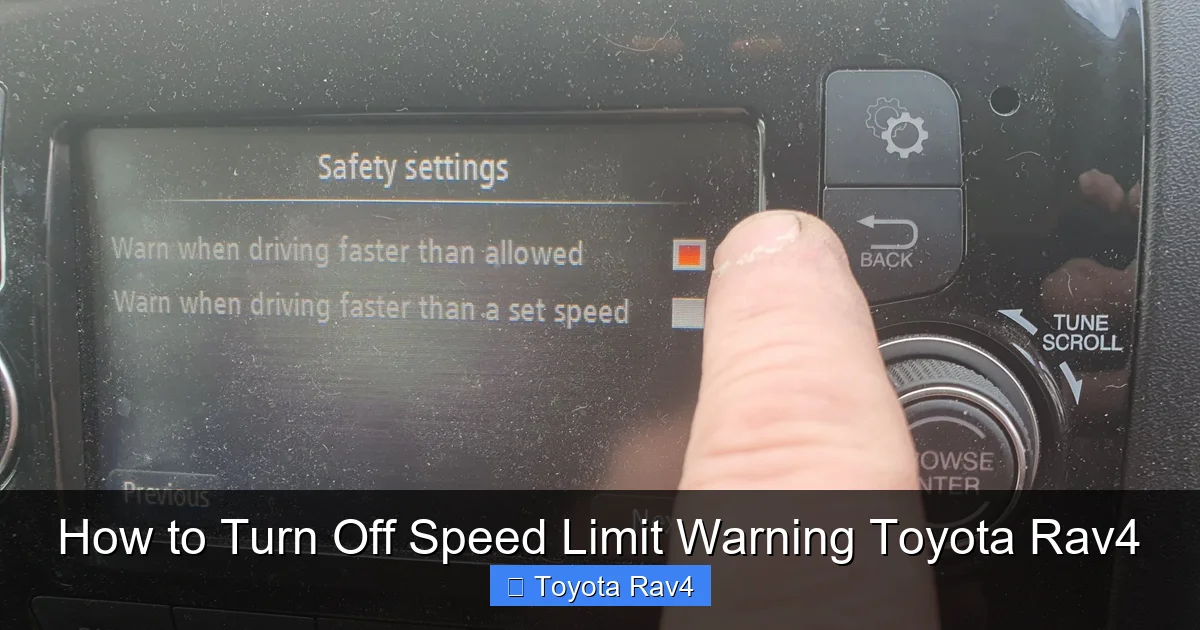
Visual guide about How to Turn Off Speed Limit Warning Toyota Rav4
Image source: wildcamping.co.uk
Now that you understand how the system works, let’s get to the main event: turning it off. The process varies slightly depending on your RAV4’s model year and infotainment system, but the general steps are consistent across most vehicles. Below is a detailed, step-by-step guide to help you disable the speed limit warning using your vehicle’s built-in controls.
Method 1: Using the Multi-Information Display (MID)
The most common way to turn off the speed limit warning is through the Multi-Information Display (MID), which is the screen located between your speedometer and tachometer in the instrument cluster. Here’s how to do it:
1. **Start your vehicle** and ensure it’s in park or neutral with the parking brake engaged.
2. **Locate the steering wheel controls** on the left side of the steering wheel. You’ll see buttons labeled “DISP,” “INFO,” “<,” “>,” and “OK.”
3. **Press the “DISP” button** repeatedly until you see the “Settings” or “Vehicle Settings” menu on the MID.
4. **Use the “<” and “>” arrows** to navigate to the “Safety” or “Driver Assistance” section.
5. **Press “OK”** to enter the menu.
6. **Scroll down** to find “Speed Limit Warning” or “Speed Limit Alert.”
7. **Select it and toggle it off** using the “OK” button or arrow keys.
8. **Exit the menu** by pressing “DISP” or waiting for it to time out.
Once disabled, the audible and visual alerts will no longer appear when you exceed the speed limit. However, the system will still detect speed limits and may display them on the screen—just without the warning.
Method 2: Temporary Muting via the DISP Button
If you don’t want to permanently disable the feature but just need a quick silence, Toyota offers a temporary mute option. This is especially useful if you’re driving on a road where the speed limit changes frequently or if you’re temporarily exceeding the limit for safety reasons (e.g., merging onto a highway).
To temporarily mute the speed limit warning:
1. **When the alert sounds**, press and hold the “DISP” button on the steering wheel for about 3 seconds.
2. The warning will be silenced for the current trip.
3. The system will reactivate automatically the next time you start the vehicle.
This method doesn’t turn off the feature permanently—it just gives you a break from the noise when you need it most.
Method 3: Using the Toyota Multimedia System (2021 and Newer Models)
Starting with the 2021 model year, Toyota updated the RAV4’s infotainment system to include more integrated safety settings. If your RAV4 has the newer Toyota Multimedia system (with a larger touchscreen and enhanced connectivity), you may be able to adjust the speed limit warning directly from the main display.
Here’s how:
1. **Tap the “Menu” icon** on the touchscreen.
2. **Select “Settings”** > “Vehicle” > “Driver Assistance.”
3. **Find “Speed Limit Warning”** and toggle it off.
4. **Confirm your selection** when prompted.
This method is more intuitive for drivers who prefer touchscreen controls over steering wheel buttons. However, not all trims include this option—check your owner’s manual or vehicle settings to confirm availability.
Important Notes and Limitations
While the steps above work for most RAV4 models, there are a few important caveats:
– **Not all models allow full deactivation:** Some older or base-trim RAV4s may only allow you to adjust the sensitivity (e.g., warning at 10 mph over vs. 5 mph over) but not turn it off completely.
– **Software updates may reset settings:** After a Toyota software update—either over-the-air or at the dealership—your custom settings might revert to default. You may need to re-disable the warning.
– **Dealer tools may be required:** In rare cases, especially with vehicles equipped with advanced safety packages (like Toyota Safety Sense 2.5+), full deactivation may require a technician using Toyota’s Techstream diagnostic tool. This is more common in fleet or commercial vehicles.
Always consult your owner’s manual for model-specific instructions. If you’re unsure, visit a Toyota dealership or certified technician for assistance.
Model-Specific Instructions by Year
Because Toyota has updated the RAV4’s safety systems over the years, the exact steps to disable the speed limit warning can vary. Below is a breakdown by model year to help you find the right method for your vehicle.
2019–2020 Toyota RAV4
The 2019 and 2020 RAV4 models were the first to include Toyota Safety Sense 2.0 as standard on most trims. These vehicles use the older-style instrument cluster with a smaller MID screen.
To turn off the speed limit warning:
– Use the steering wheel controls to navigate to “Settings” > “Safety” > “Speed Limit Warning” and toggle it off.
– The temporary mute function (holding “DISP”) is also available.
– Note: Some 2019 models may not have the speed limit warning feature unless equipped with the Advanced Safety Package.
2021–2023 Toyota RAV4
With the 2021 refresh, Toyota introduced a redesigned interior, including a larger touchscreen and updated software. These models often allow settings to be adjusted via both the MID and the infotainment system.
– Use either the steering wheel controls or the touchscreen menu to disable the warning.
– The system may also allow you to adjust the warning threshold (e.g., warn only when exceeding by 10 mph instead of 5 mph).
– Hybrid and Prime models typically have the same options as their gas counterparts.
2024 Toyota RAV4 and Beyond
The 2024 RAV4 continues to use Toyota Safety Sense 2.5+, with improved camera resolution and more accurate sign detection. The user interface is more streamlined, and settings are easier to access.
– The speed limit warning can usually be turned off via the touchscreen under “Settings” > “Vehicle” > “Safety.”
– Some trims may include a “Do Not Disturb” mode that silences all non-critical alerts, including speed warnings.
– Over-the-air updates may occasionally reset preferences, so check your settings after updates.
Safety Considerations and Best Practices
While it’s technically possible to turn off the speed limit warning, it’s important to consider the safety implications. These alerts are designed to protect you and others on the road, and disabling them doesn’t mean you should ignore speed limits.
Why You Might Want to Keep It On
– **Prevents accidental speeding:** Even experienced drivers can lose track of their speed, especially on long highway drives.
– **Helps in unfamiliar areas:** If you’re traveling to a new city or rural area, the system can alert you to sudden speed limit changes.
– **Supports defensive driving:** Reminders to slow down can reduce the risk of accidents, tickets, and insurance claims.
When It’s Okay to Disable It
– **On familiar routes:** If you drive the same roads daily and know the speed limits by heart, the alerts may be unnecessary.
– **In areas with inaccurate signage:** Some roads have outdated or misleading speed limit signs. In these cases, the system may trigger false alarms.
– **For personal preference:** Some drivers simply find constant beeping distracting and prefer a quieter cabin.
Best Practices for Safe Driving
Even with the warning turned off, follow these tips to stay safe:
– **Always obey posted speed limits.** They’re set for a reason—based on road design, traffic patterns, and safety studies.
– **Adjust your speed for conditions.** Rain, fog, construction, and heavy traffic may require driving below the posted limit.
– **Use cruise control wisely.** On highways, cruise control can help maintain a steady speed, but avoid using it in poor weather or heavy traffic.
– **Stay alert and focused.** No system can replace attentive driving. Keep your eyes on the road and avoid distractions.
Troubleshooting Common Issues
Sometimes, even after following the steps above, the speed limit warning may still appear—or not appear when it should. Here are some common issues and how to fix them.
The Warning Won’t Turn Off
If you’ve followed the steps but the alert still sounds:
– **Check for software updates:** Outdated software can cause glitches. Visit a Toyota dealer or use the Toyota app to check for updates.
– **Reset the system:** Turn the vehicle off, wait 10 minutes, then restart. This can reset the safety systems.
– **Consult the dealer:** If the issue persists, there may be a deeper software or hardware problem requiring professional diagnosis.
The System Shows Wrong Speed Limits
If your RAV4 displays incorrect speed limits:
– **Clean the windshield:** Dirt, snow, or ice on the camera can block sign detection.
– **Update map data:** Some systems allow you to update GPS maps via USB or over-the-air. Check your owner’s manual for instructions.
– **Report errors:** Toyota uses driver feedback to improve map accuracy. Use the “Report an Issue” feature in the Toyota app if available.
The Alert Is Too Sensitive
If the system warns you even when you’re only slightly over the limit:
– **Adjust the sensitivity:** On some models, you can change the threshold (e.g., warn only when exceeding by 10 mph).
– **Use temporary mute:** Press and hold “DISP” to silence it for the trip.
Conclusion
The speed limit warning in your Toyota RAV4 is a helpful safety feature, but it’s not for everyone. Whether you find it annoying, unnecessary, or just prefer a quieter drive, knowing how to turn off speed limit warning Toyota RAV4 gives you greater control over your driving experience. With the right steps—whether through the multi-information display, steering wheel controls, or touchscreen menu—you can disable or adjust the alerts to suit your preferences.
Remember, though, that safety should always come first. Disabling the warning doesn’t give you a free pass to speed—it just removes the reminder. Stay aware of posted limits, drive responsibly, and use the feature as a tool to enhance your safety, not hinder it.
If you’re ever unsure about the process or run into issues, don’t hesitate to consult your owner’s manual or visit a Toyota service center. With a little know-how, you can enjoy all the benefits of your RAV4’s advanced safety systems—on your terms.
Frequently Asked Questions
Can I permanently disable the speed limit warning on my Toyota RAV4?
Yes, on most RAV4 models from 2019 onward, you can permanently disable the speed limit warning through the vehicle’s settings menu using the steering wheel controls or touchscreen. However, some older or base trims may only allow sensitivity adjustments.
Will turning off the speed limit warning affect other safety features?
No, disabling the speed limit warning only turns off the audible and visual alerts. Other safety features like lane departure warning, automatic emergency braking, and adaptive cruise control will continue to function normally.
Why does my RAV4 show the wrong speed limit?
This can happen due to outdated map data, poor camera visibility (e.g., dirty windshield), or unclear road signage. Cleaning the camera lens and updating your vehicle’s software or maps may help.
Can I mute the speed limit warning temporarily?
Yes, press and hold the “DISP” button on the steering wheel for about 3 seconds when the alert sounds. This will silence it for the current trip only.
Do all Toyota RAV4 trims have the speed limit warning feature?
No, the feature is typically available on mid- to high-end trims like XLE, XLE Premium, Limited, and Adventure. Base LE models may not include it unless added as an option.
Will a software update reset my speed limit warning settings?
Yes, Toyota software updates—especially over-the-air updates—can sometimes reset custom settings to factory defaults. You may need to re-disable the warning after an update.