
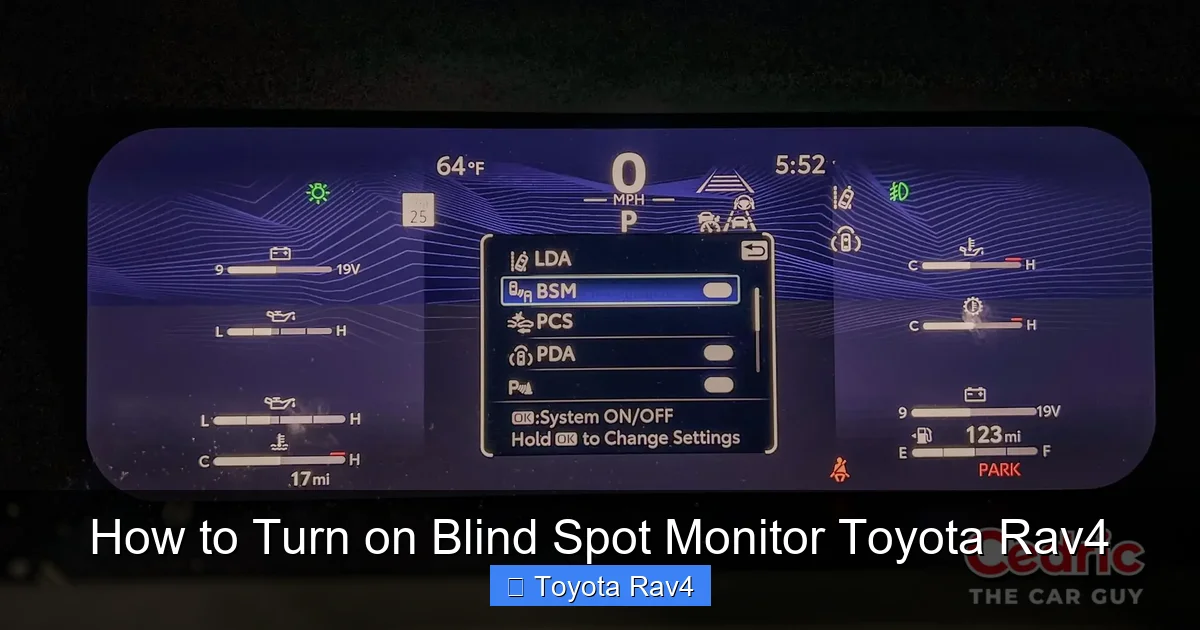
Turning on the blind spot monitor in your Toyota RAV4 is simple and enhances driving safety. This guide walks you through setup, activation, and troubleshooting for all RAV4 models with this advanced safety feature.
This is a comprehensive guide about how to turn on blind spot monitor toyota rav4.
Key Takeaways
- Check Model Compatibility: Not all RAV4 trims come with blind spot monitoring—verify your vehicle has the feature before attempting activation.
- Use the Multi-Information Display (MID): Most RAV4 models allow you to enable or disable the system via the steering wheel controls and MID menu.
- Ensure Sensors Are Clean: Dirt, snow, or debris on rear bumper sensors can disable the system—regular cleaning is essential.
- System Activates Automatically at Speed: The blind spot monitor typically turns on when driving above 18–20 mph and deactivates at low speeds.
- Troubleshoot Warning Lights: If the BSM indicator stays on, check for obstructions, software glitches, or sensor damage.
- Update Software Regularly: Visit a Toyota dealer to ensure your vehicle’s safety systems are running the latest firmware.
- Practice Safe Driving Habits: Blind spot monitoring is a helpful tool, but always perform shoulder checks—don’t rely solely on technology.
[FEATURED_IMAGE_PLACEHOLDER]
How to Turn on Blind Spot Monitor Toyota RAV4
Driving a Toyota RAV4 means enjoying a blend of reliability, comfort, and advanced safety technology. One of the standout features in many newer RAV4 models is the blind spot monitor (BSM), a system designed to help drivers detect vehicles in their blind spots—those tricky areas alongside and slightly behind the vehicle that aren’t visible in side mirrors. Whether you’re changing lanes on the highway or merging into traffic, this feature can be a real lifesaver.
But what if your blind spot monitor isn’t working? Or maybe you’re not even sure how to turn it on? Don’t worry—you’re not alone. Many RAV4 owners are unaware that the system can be manually enabled or disabled, or that certain conditions might prevent it from functioning properly. This comprehensive guide will walk you through everything you need to know about how to turn on the blind spot monitor in your Toyota RAV4, from basic activation steps to troubleshooting common issues.
We’ll cover model-specific instructions, explain how the system works, and offer practical tips to keep it running smoothly. Whether you drive a 2020 RAV4 Hybrid, a 2023 RAV4 Adventure, or an older model with BSM capability, this guide is designed to help you get the most out of your vehicle’s safety features. Let’s dive in.
Understanding the Blind Spot Monitor System in the Toyota RAV4
Before we get into the “how-to,” it’s important to understand what the blind spot monitor actually does and how it works. The BSM system in the Toyota RAV4 uses radar sensors mounted behind the rear bumper to detect vehicles in adjacent lanes that may be in your blind spot. When a vehicle is detected, a warning indicator—usually a yellow or amber light—appears in the corresponding side mirror. If you activate your turn signal while a vehicle is in your blind spot, the system may flash the warning light and, in some models, emit an audible alert.
This technology is especially useful during highway driving, where quick lane changes are common and blind spots can be dangerous. It’s not meant to replace traditional driving habits like checking mirrors and performing shoulder checks, but rather to serve as an extra layer of protection.
It’s also worth noting that not every RAV4 comes equipped with blind spot monitoring. The feature is typically available on higher trims such as the XLE, XLE Premium, Limited, and Adventure, and is often included in safety packages like Toyota Safety Sense 2.0 or 2.5+. If you’re unsure whether your RAV4 has BSM, check your owner’s manual or look for small radar sensors on the rear bumper—usually located near the taillights.
How the System Detects Vehicles
The blind spot monitor uses two radar sensors—one on each side of the rear bumper—to scan the areas alongside and slightly behind the vehicle. These sensors emit radio waves that bounce off nearby objects, allowing the system to determine if another vehicle is present. The detection range is typically about 10 feet to the side and 15 feet behind the vehicle, covering the most critical blind spot zones.
Once a vehicle enters this zone, the system processes the data and triggers a warning. The response time is nearly instantaneous, giving you valuable seconds to react. The system is designed to ignore stationary objects like guardrails or parked cars, focusing only on moving vehicles that pose a potential collision risk.
When the System Activates and Deactivates
One common misconception is that the blind spot monitor is always “on.” In reality, it operates under specific conditions. Most RAV4 models activate the BSM system when the vehicle reaches speeds above 18 to 20 mph. Below this threshold—such as during city driving or parking—the system typically remains inactive. This is because blind spots are less of a concern at low speeds, and the system conserves power and reduces false alerts.
Additionally, the system may temporarily disable itself if the sensors are obstructed by dirt, snow, ice, or mud. This is a safety feature to prevent inaccurate readings. Once the obstruction is cleared, the system should resume normal operation. Some models also allow drivers to manually turn the system off via the vehicle settings, though it will usually reactivate the next time you start the car.
Step-by-Step Guide: How to Turn on Blind Spot Monitor Toyota RAV4
Now that you understand how the system works, let’s get into the practical steps for turning on the blind spot monitor in your Toyota RAV4. The process varies slightly depending on your model year and trim level, but the general method remains consistent across most vehicles equipped with BSM.
Using the Multi-Information Display (MID)
The most common way to enable or disable the blind spot monitor is through the Multi-Information Display (MID), which is located in the instrument cluster behind the steering wheel. Here’s how to do it:
1. Start your RAV4 and ensure the ignition is on (you don’t need to be driving).
2. Use the steering wheel controls—typically the “DISP” or “INFO” button—to navigate through the MID menu.
3. Scroll to the “Settings” or “Vehicle Settings” option.
4. Look for a menu labeled “Blind Spot Monitor,” “BSM,” or “Safety Systems.”
5. Select the option and toggle it to “On.”
6. Exit the menu. The system should now be active.
On some models, you may need to press and hold a button or confirm your selection. If you’re having trouble finding the menu, consult your owner’s manual—it will have model-specific instructions.
Using the Touchscreen Infotainment System
In newer RAV4 models (2021 and later), Toyota has integrated more safety settings into the central touchscreen. Here’s how to access the blind spot monitor settings this way:
1. Tap the “Menu” or “Settings” icon on the home screen.
2. Select “Vehicle” or “Driving Assist.”
3. Look for “Blind Spot Monitor” or “BSM.”
4. Toggle the switch to “On.”
5. You may also see options to customize alerts, such as enabling audible warnings or adjusting sensitivity.
This method is more intuitive for drivers who prefer using the touchscreen over the steering wheel controls. It also allows for more detailed customization in some trims.
Verifying the System Is Active
After enabling the blind spot monitor, it’s a good idea to verify that it’s working. Here’s a simple test you can do in a safe, controlled environment:
1. Drive on a quiet road at or above 20 mph.
2. Have a friend drive alongside your vehicle in the adjacent lane.
3. Observe the side mirror—when the other vehicle enters your blind spot, the warning light should illuminate.
4. Activate your turn signal while the vehicle is still in the blind spot. The light should flash, and you may hear a beep (if audible alerts are enabled).
If the system doesn’t respond, double-check that it’s enabled in the settings and that the sensors are clean and unobstructed.
Model-Specific Instructions
While the general steps apply to most RAV4s, there are slight variations by model year:
– 2019–2020 RAV4: Use the MID menu via steering wheel controls. The BSM option is usually under “Settings” > “Safety.”
– 2021–2023 RAV4: Access via touchscreen under “Vehicle” > “Driving Assist” > “Blind Spot Monitor.”
– RAV4 Hybrid: Same as gas models, but ensure the hybrid system is in “Ready” mode (not just accessory mode) for full functionality.
– RAV4 Prime (Plug-in Hybrid): Includes additional safety features; BSM settings may be grouped with other driver-assist technologies.
Always refer to your owner’s manual for the most accurate instructions tailored to your specific vehicle.
Troubleshooting Common Blind Spot Monitor Issues
Even with proper setup, you might encounter issues with your blind spot monitor. Here are some common problems and how to fix them.
Blind Spot Monitor Warning Light Stays On
If the BSM warning light (usually a yellow icon with two cars) remains illuminated on your dashboard, it could indicate a system malfunction. Possible causes include:
– Obstructed sensors: Dirt, snow, or mud covering the rear bumper sensors can block radar signals. Clean the area gently with a soft cloth and mild soap.
– Damaged sensors: A minor accident or parking scrape might have misaligned or damaged the sensors. Have them inspected by a Toyota technician.
– Software glitch: Sometimes, the system needs a reset. Try turning the vehicle off, waiting 30 seconds, and restarting it.
– Faulty wiring or module: In rare cases, internal electrical issues may require professional diagnosis.
If the light persists after cleaning and restarting, schedule a service appointment.
System Not Activating at Speed
If the blind spot monitor doesn’t turn on when you exceed 20 mph, check the following:
– Ensure the system is enabled in the settings.
– Verify that the vehicle speed sensor is functioning (a malfunction could prevent activation).
– Check for any dashboard warning lights related to the braking or stability control systems, as these can affect BSM operation.
False Alerts or No Alerts
If the system triggers warnings when no vehicles are present (false positives) or fails to alert you when it should (false negatives), consider these fixes:
– Clean the sensors thoroughly—even a thin layer of grime can distort readings.
– Avoid placing stickers, bike racks, or cargo carriers near the sensors, as they can interfere with radar signals.
– Update the vehicle’s software at a Toyota dealership. Older firmware may have bugs affecting sensor accuracy.
System Disabled After Battery Replacement
If you’ve recently replaced your car battery or had electrical work done, the blind spot monitor may have been reset or disabled. Re-enable it using the MID or touchscreen method described earlier. In some cases, the system may need to be recalibrated by a technician, especially if the rear bumper was removed.
Maintaining Your Blind Spot Monitor for Optimal Performance
Like any advanced safety system, the blind spot monitor requires regular maintenance to function reliably. Here are some tips to keep it in top condition.
Keep Sensors Clean
The radar sensors on the rear bumper are sensitive to dirt, salt, snow, and debris. After driving in harsh weather or on gravel roads, take a moment to wipe the sensor areas with a damp cloth. Avoid using high-pressure washes directly on the sensors, as this can damage them.
Inspect for Physical Damage
Periodically check the rear bumper for cracks, dents, or misalignment. Even minor damage can affect sensor performance. If you notice any issues, have them repaired promptly.
Update Software Regularly
Toyota periodically releases software updates that improve the performance of safety systems like BSM. Visit your local dealership for a complimentary check-up and update if needed. This is especially important after major model updates or recalls.
Avoid Modifications Near Sensors
Installing aftermarket accessories like tow hitches, bike racks, or bumper guards can interfere with sensor operation. If you must add accessories, choose ones designed for your RAV4 model and ensure they don’t obstruct the sensor zones.
Test the System Monthly
Make it a habit to test your blind spot monitor once a month. A quick drive with a friend or family member can help confirm that the system is working as expected. This simple practice can catch issues early and give you peace of mind.
Frequently Asked Questions About Toyota RAV4 Blind Spot Monitor
Can I turn off the blind spot monitor permanently?
Yes, you can disable the blind spot monitor through the vehicle settings, but it will typically reactivate the next time you start the car. There’s no permanent “off” switch, as Toyota encourages the use of safety features.
Does the blind spot monitor work in reverse?
No, the blind spot monitor is designed for forward driving and lane changes. For reversing, rely on the rearview camera and parking sensors, which are separate systems.
Will the system work in heavy rain or snow?
The system is designed to function in most weather conditions, but heavy rain, snow, or ice can temporarily reduce accuracy. Always clean the sensors after恶劣天气 and drive cautiously.
Can I add blind spot monitoring to an older RAV4?
It’s technically possible with aftermarket kits, but installation is complex and may not integrate seamlessly with your vehicle’s systems. For best results, consider upgrading to a newer RAV4 with factory-installed BSM.
Why does the BSM light flash when I use my turn signal?
This is normal. The flashing light indicates that a vehicle is in your blind spot and you’re attempting to change lanes. It’s a warning to check your surroundings before proceeding.
Does the blind spot monitor work at night?
Yes, the system uses radar, not cameras, so it functions equally well in daylight, nighttime, and low-visibility conditions like fog or rain.
Conclusion: Drive Safer with Your Toyota RAV4’s Blind Spot Monitor
Knowing how to turn on the blind spot monitor in your Toyota RAV4 is more than just a convenience—it’s a step toward safer, more confident driving. This advanced safety feature acts as an extra set of eyes, helping you avoid dangerous lane-change collisions and giving you peace of mind on the road.
By following the steps outlined in this guide, you can easily enable the system, troubleshoot common issues, and maintain it for long-term reliability. Remember, while technology like BSM is incredibly helpful, it’s not a substitute for attentive driving. Always check your mirrors, signal your intentions, and perform shoulder checks—especially in complex traffic situations.
Whether you’re a new RAV4 owner or have been driving one for years, taking the time to understand and properly use your blind spot monitor can make a real difference. So the next time you’re merging onto the highway or changing lanes in busy traffic, you’ll know your RAV4 has your back.
Stay safe, stay informed, and enjoy every mile in your Toyota RAV4.
Frequently Asked Questions
What is how to turn on blind spot monitor toyota rav4?
how to turn on blind spot monitor toyota rav4 is an important topic with many practical applications.