
Resetting the trip meter on your 2023 Toyota RAV4 is quick and simple—no tools or dealer visit needed. Whether you’re tracking fuel economy, planning a road trip, or logging service intervals, mastering this feature helps you stay organized and informed about your vehicle’s performance.
So, you’ve just filled up your gas tank, started a new road trip, or hit a milestone in your maintenance schedule—and now you want to reset the trip meter on your 2023 Toyota RAV4. You’re not alone. Many RAV4 owners find themselves wondering, “How do I reset this thing?” The good news? It’s easier than you think. And once you know how, you’ll wonder how you ever lived without using this handy feature.
The trip meter is one of those underrated tools in your dashboard that can actually make a big difference in how you manage your vehicle. Whether you’re trying to monitor your fuel efficiency, keep track of miles between oil changes, or simply log how far you’ve driven on a weekend getaway, the trip meter gives you real-time, customizable data. And with the 2023 RAV4’s intuitive digital display and responsive steering wheel controls, accessing and resetting this info takes just a few seconds.
In this guide, we’ll walk you through everything you need to know about resetting the trip meter on your 2023 Toyota RAV4—step by step, with clear instructions, practical tips, and real-life examples. We’ll also explain why this feature matters, how to use both Trip A and Trip B effectively, and answer common questions that come up. By the end, you’ll be a trip meter pro, ready to make the most of your RAV4’s smart dashboard features.
Key Takeaways
- Two trip meters available: The 2023 RAV4 has Trip A and Trip B, allowing you to track different journeys or purposes separately.
- Reset via steering wheel controls: Use the left-side buttons on the steering wheel to navigate the multi-information display (MID) and reset trip data.
- No ignition restart required: You can reset the trip meter while the engine is running or in accessory mode—no need to turn the car off and on.
- Useful for fuel tracking: Resetting before filling up helps calculate accurate miles per gallon (MPG) for better fuel efficiency monitoring.
- Helps with maintenance logs: Use Trip B to track mileage between oil changes or other scheduled services.
- Works across all trims: Whether you have the base LE or top-tier Limited Hybrid, the process is identical.
- Reset doesn’t affect odometer: Only trip mileage is cleared—your total vehicle mileage remains unchanged.
📑 Table of Contents
Understanding the Trip Meter in the 2023 Toyota RAV4
Before we dive into the “how,” let’s talk about the “what.” What exactly is a trip meter, and why should you care about it?
The trip meter is a secondary odometer built into your vehicle’s instrument cluster. Unlike the main odometer—which records the total distance your car has ever traveled—the trip meter is resettable. That means you can start fresh whenever you want. Think of it like a digital notepad for your journeys. You can use it to track a single tank of gas, a road trip, or even the miles between service appointments.
The 2023 Toyota RAV4 comes equipped with two trip meters: Trip A and Trip B. This dual-system design gives you flexibility. For example, you might use Trip A to track your daily commute and Trip B to monitor miles since your last oil change. Or, if you’re planning a cross-country adventure, you can reset Trip A at the start and watch the miles roll up as you explore.
These trip meters are displayed on the multi-information display (MID), which sits right in the center of your instrument cluster. The MID is a sleek, high-resolution screen that shows everything from fuel economy and driving range to tire pressure and safety alerts. And the best part? You control it all using the buttons on your steering wheel—no fumbling with touchscreens or menus while driving.
One common misconception is that resetting the trip meter affects your main odometer. That’s not true. The odometer is permanent and cannot be altered (and for good reason—it’s a legal record of your vehicle’s usage). The trip meter, on the other hand, is fully under your control. You can reset it as often as you like, and it won’t impact any other system in your car.
So why use it? Let’s say you want to see how many miles per gallon your RAV4 is getting on a tank of gas. You fill up, reset Trip A, drive around, and then check the mileage when you refuel again. Divide the miles driven by the gallons used, and you’ve got your MPG. Simple, right? Or maybe you’re due for an oil change every 5,000 miles. By resetting Trip B after each service, you’ll always know exactly how far you’ve gone since the last one.
In short, the trip meter is a small feature with big benefits. It helps you stay informed, save money on fuel, and keep up with maintenance—all without needing a notebook or smartphone app. And with the 2023 RAV4’s user-friendly design, using it is a breeze.
Locating the Trip Meter on Your Dashboard
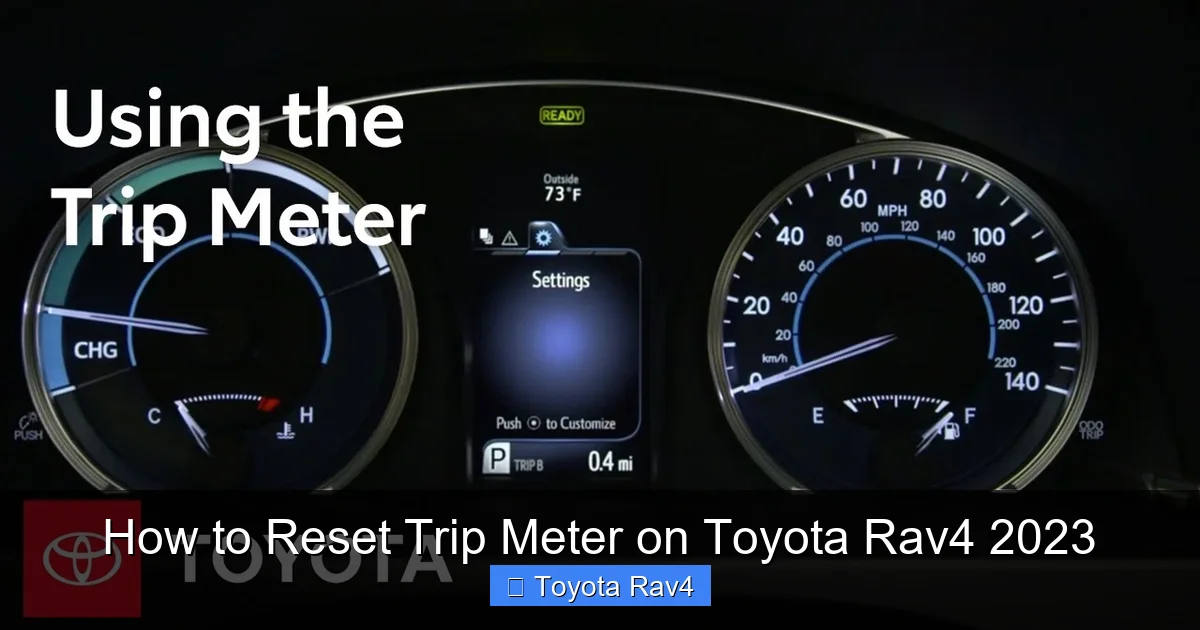
Visual guide about How to Reset Trip Meter on Toyota Rav4 2023
Image source: i.ytimg.com
Now that you know what the trip meter is and why it’s useful, let’s talk about where to find it. If you’ve never looked for it before, it might seem a little hidden—but once you know where to look, it’s right in front of you.
The trip meter display is part of the multi-information display (MID), which is located in the center of your instrument cluster, right behind the steering wheel. Depending on your RAV4’s trim level, this could be a 7-inch or 12.3-inch digital screen. Even if you have the smaller display, the trip meter is still clearly visible.
When you start your car, the MID will show a variety of information by default—things like current speed, fuel level, and driving range. To see the trip meter, you’ll need to navigate to the correct screen. Here’s how:
Use the left-side buttons on your steering wheel. These are the ones labeled with arrows (up/down) and an “OK” or “Enter” button. Press the up or down arrow to scroll through the different display modes. You’ll cycle through options like fuel economy, average speed, trip information, and more.
When you land on the trip screen, you’ll see both Trip A and Trip B listed, along with their current mileage. For example, it might show:
– Trip A: 1,247 mi
– Trip B: 3,450 mi
You can switch between viewing Trip A and Trip B by pressing the “OK” button or using the arrow keys, depending on your model. Some trims also allow you to customize what’s shown on the screen, so you can set it to always display the trip meter when you start the car.
If you’re having trouble finding it, try this: Turn the ignition to “ON” (you don’t need to start the engine). Then, press and hold the “DISP” button on the steering wheel for a few seconds. This will cycle through the display modes quickly, and you should see the trip meter appear.
It’s also worth noting that the trip meter is always active—even if it’s not currently displayed. That means it’s constantly recording your mileage, whether you’re looking at it or not. So even if you forget to check it for a week, the data is still there.
Pro tip: If you’re using your RAV4 for towing or hauling, consider using Trip B to track those specific trips. That way, you can monitor wear and tear on your vehicle and plan maintenance accordingly.
Step-by-Step Guide to Resetting the Trip Meter
Alright, now for the main event: how to actually reset the trip meter on your 2023 Toyota RAV4. Don’t worry—it’s not complicated. In fact, it’s one of the simplest things you can do with your car’s dashboard. And once you’ve done it once, you’ll be able to do it in your sleep.
Here’s the step-by-step process:
Step 1: Turn on the Ignition
You don’t need to start the engine, but you do need to turn the ignition to the “ON” position. This powers up the dashboard and allows you to access the multi-information display. You can do this by pressing the “START” button without pressing the brake pedal, or by turning the key if you have a keyed ignition (though most 2023 RAV4s are push-button start).
Step 2: Navigate to the Trip Meter Screen
Use the arrow buttons on the left side of your steering wheel to scroll through the display options. Press the up or down arrow until you see the trip meter screen. You’ll know you’re there when you see “Trip A” and “Trip B” with their current mileage.
Step 3: Select the Trip You Want to Reset
If you want to reset Trip A, make sure it’s highlighted or selected. On most models, you can press the “OK” button to toggle between Trip A and Trip B. Some displays will show a small arrow or highlight to indicate which trip is active.
Step 4: Press and Hold the “OK” Button
Once the desired trip (A or B) is selected, press and hold the “OK” button for about 3 to 5 seconds. You’ll see the mileage begin to count down to zero. When it reaches 0.0, the trip meter has been successfully reset.
Step 5: Confirm the Reset
Release the button and check the display. The trip meter should now show “0.0 mi” or “0.0 km,” depending on your unit settings. The reset is complete.
That’s it! You’ve just reset your trip meter. The whole process takes less than 10 seconds.
Let’s walk through a real-life example. Say you’re about to start a road trip from Los Angeles to San Francisco. You fill up your tank, hop in the car, and want to track exactly how far you go. You follow the steps above, reset Trip A, and hit the road. As you drive, the trip meter counts up: 50 miles, 100 miles, 380 miles—right up to your destination. When you get there, you know exactly how far you traveled, and you can use that info to plan your return trip or calculate fuel costs.
Another example: You just had your oil changed at 45,000 miles. You reset Trip B at that moment. Now, every time you drive, Trip B tracks the miles since the service. When it hits 5,000 miles, you know it’s time for the next oil change—no guessing, no sticky notes on the dashboard.
One thing to keep in mind: You can only reset one trip at a time. If you want to reset both Trip A and Trip B, you’ll need to repeat the process for each one. Also, if you accidentally reset the wrong trip, don’t panic—just drive a bit and note the mileage, or use your odometer to estimate what it should be.
Using Trip A and Trip B for Different Purposes
Now that you know how to reset the trip meter, let’s talk about how to use it wisely. The 2023 RAV4 gives you two trip meters for a reason—so you can track different things at the same time. Here’s how smart drivers use Trip A and Trip B to their advantage.
Trip A: Daily Driving and Fuel Efficiency
Many RAV4 owners use Trip A to track their daily driving. For example, you might reset it every time you fill up your gas tank. This lets you see exactly how many miles you’ve driven on that tank of gas. When you stop to refuel again, you can calculate your fuel economy by dividing the trip mileage by the number of gallons you added.
Let’s say you reset Trip A at the pump, drive 320 miles, and then add 12.5 gallons of gas. Your MPG is 320 ÷ 12.5 = 25.6 MPG. That’s useful info—especially if you’re trying to improve your fuel efficiency or compare different driving conditions (city vs. highway, for instance).
You can also use Trip A to track short trips. Maybe you’re running errands around town and want to see how much you’re driving each week. Reset Trip A on Monday, and by Friday, you’ll have a clear picture of your weekly mileage.
Trip B: Maintenance and Long-Term Tracking
Trip B is perfect for longer-term tracking. A common use is monitoring mileage between oil changes. Most Toyota recommends an oil change every 5,000 to 10,000 miles, depending on driving conditions and oil type. By resetting Trip B after each service, you’ll always know when it’s time for the next one.
For example, your mechanic changes your oil at 47,500 miles. You reset Trip B, and now it starts counting from zero. When Trip B hits 5,000 miles, you know you’re due for another oil change—even if your total odometer is now at 52,500.
You can also use Trip B for seasonal tracking. If you take your RAV4 on a summer road trip every year, reset Trip B at the start of the trip. When you return, you’ll know exactly how far you drove. This is great for logging vacation miles or planning future trips.
Other Creative Uses
Some drivers use the trip meters for even more creative purposes. For instance:
– Tracking miles for tax deductions (if you use your car for business).
– Monitoring how far you drive to work each month.
– Comparing fuel economy between different gas stations or fuel brands.
– Logging miles for a charity drive or fundraising event.
The key is to pick a system that works for you and stick with it. Consistency makes the data more useful. And because the trip meters are so easy to reset, there’s no reason not to use them regularly.
Troubleshooting Common Issues
Even though resetting the trip meter is simple, sometimes things don’t go as planned. Here are a few common issues and how to fix them.
The Trip Meter Won’t Reset
If you press and hold the “OK” button and nothing happens, check a few things:
– Make sure the ignition is on. The dashboard won’t respond if the car is completely off.
– Ensure you’re on the correct screen. You need to be viewing the trip meter display, not fuel economy or range.
– Try pressing the “DISP” button to cycle through screens and return to the trip meter.
– If it still doesn’t work, try turning the car off and on again. Sometimes a quick reboot fixes minor glitches.
Accidentally Reset the Wrong Trip
If you reset Trip A when you meant to reset Trip B, don’t worry. You can’t “undo” a reset, but you can estimate the mileage. Check your odometer and subtract the current Trip B mileage to get a rough idea of what Trip A should have been. Or, just start fresh and use the new reset for your current purpose.
Trip Meter Shows “—” or “Error”
This is rare, but if your trip meter displays dashes or an error message, it could be a software glitch. Try turning the car off, waiting 30 seconds, and turning it back on. If the problem persists, consult your owner’s manual or visit a Toyota service center.
Buttons Feel Stiff or Unresponsive
Over time, steering wheel buttons can get sticky or less responsive. Try cleaning them gently with a soft cloth and a bit of isopropyl alcohol. Avoid using water or harsh chemicals, which can damage the electronics.
Remember, the trip meter is a software feature, not a mechanical one. It’s designed to be reliable, but like any digital system, it can occasionally hiccup. Most issues are easy to resolve with a little patience.
Tips for Getting the Most Out of Your Trip Meter
Now that you’re a trip meter expert, here are some pro tips to help you get even more value from this feature.
Reset at the Pump
Make it a habit to reset your trip meter every time you fill up. This gives you the most accurate fuel economy readings. Plus, it only takes a few seconds—less time than it takes to put the gas cap back on.
Use Both Trips Strategically
Don’t just use one trip meter and ignore the other. Assign specific purposes to Trip A and Trip B, like we discussed earlier. This way, you’re always tracking something useful.
Check It Weekly
Even if you don’t reset it every week, take a quick look at your trip meters once a week. This helps you stay aware of your driving habits and catch any unusual mileage spikes (like a long, unplanned trip).
Combine with Other Features
The 2023 RAV4 has other helpful tools, like average fuel economy and driving range. Use these together with your trip meter for a complete picture of your vehicle’s performance. For example, if your trip meter shows 300 miles and your average MPG is 28, you can estimate your fuel usage.
Teach Your Family
If other people drive your RAV4, show them how to use the trip meter too. That way, everyone can contribute to tracking fuel, maintenance, and trips—no confusion or missed resets.
Keep a Log (Optional)
For extra organization, jot down your trip meter readings in a notebook or phone app. This creates a long-term record you can refer back to, especially for tax or maintenance purposes.
Conclusion
Resetting the trip meter on your 2023 Toyota RAV4 is one of those small skills that makes a big difference. It’s quick, easy, and incredibly useful—whether you’re tracking fuel economy, planning maintenance, or just curious about how far you’ve driven. With two trip meters to choose from, you can customize your tracking to fit your lifestyle.
By following the simple steps outlined in this guide, you’ll be able to reset Trip A or Trip B in seconds, using just the buttons on your steering wheel. And once you start using this feature regularly, you’ll wonder how you ever managed without it.
So next time you fill up your tank or hit a service milestone, take a moment to reset that trip meter. Your future self—and your RAV4—will thank you.
Frequently Asked Questions
Can I reset the trip meter while driving?
Yes, you can reset the trip meter while the engine is running. However, for safety, it’s best to do it when the car is stopped or at a traffic light. Avoid fiddling with controls while moving at high speeds.
Will resetting the trip meter affect my odometer?
No, resetting the trip meter only clears the trip mileage. Your main odometer, which shows total vehicle mileage, remains unchanged and cannot be reset.
How do I reset both Trip A and Trip B at the same time?
You can’t reset both trips simultaneously. You’ll need to reset Trip A first, then repeat the process for Trip B. Each trip must be reset individually.
What if my trip meter won’t reset?
Make sure the ignition is on and you’re on the correct display screen. If it still doesn’t work, try turning the car off and on again. Persistent issues may require a visit to a Toyota service center.
Can I customize what the trip meter displays?
Yes, on some trims, you can customize the multi-information display to show trip data by default. Check your owner’s manual for instructions on personalizing your dashboard layout.
Is the trip meter available on all 2023 RAV4 trims?
Yes, all 2023 Toyota RAV4 trims—from the base LE to the Limited Hybrid—come equipped with dual trip meters and the same reset functionality.